

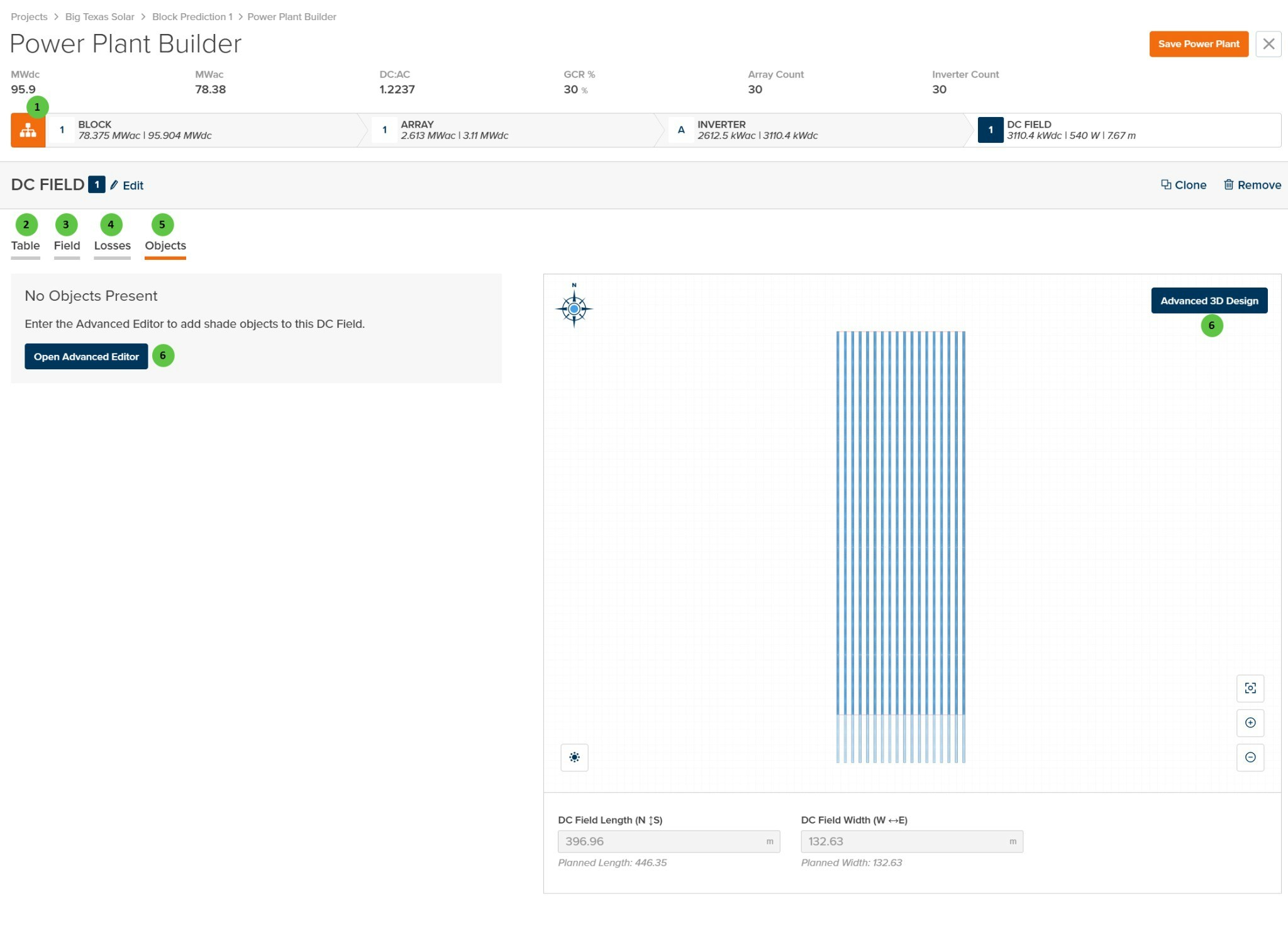
DC Field - Objects Page
Overview
The DC Field - Objects page is organized into the following sections:- DC Field Header — Shows the DC Field identifier with Edit, Clone, and Remove buttons.
- Tab Navigation — Access different aspects of DC Field configuration: Table, Field, Losses, and Objects.
- Objects Panel — Displays any configured shade objects for this DC Field. When no objects are present, provides a prompt to open the Advanced Editor.
- DC Field Visualization — Preview of the field layout with the Advanced 3D Design access button.
User Inputs
| # | Input | Type | Units | Description | Related Documentation |
|---|---|---|---|---|---|
| 1 | Block (Hierarchy) | Button | — | Toggle view to show the Block-level hierarchy bar displaying system summary: MWdc, MWac, DC:AC ratio, GCR, Array Count, and Inverter Count. | Block Overview |
| 2 | Table (Tab) | Tab | — | Navigate to the Table tab to configure module selection, mounting type, and table geometry. | Table |
| 3 | Field (Tab) | Tab | — | Navigate to the Field tab to configure string count, layout arrangement, terrain, and field-level settings. | Field |
| 4 | Losses (Tab) | Tab | — | Navigate to the Losses tab to configure DC field losses including mismatch, wiring losses, and thermal model parameters. | Losses |
| 5 | Objects (Tab) | Tab | — | Currently selected tab. Contains the legacy 3D shading objects configuration for this DC Field. | — |
| 6 | Open Advanced Editor / Advanced 3D Design | Button | — | Opens the legacy 3D shade object editor for this DC Field. Both buttons perform the same action. Use this editor to add, modify, or remove near-field shading objects such as buildings, trees, or poles. Note: This is a legacy workflow; consider using the plant-level 3D Scene for new projects. | 3D Shading |