

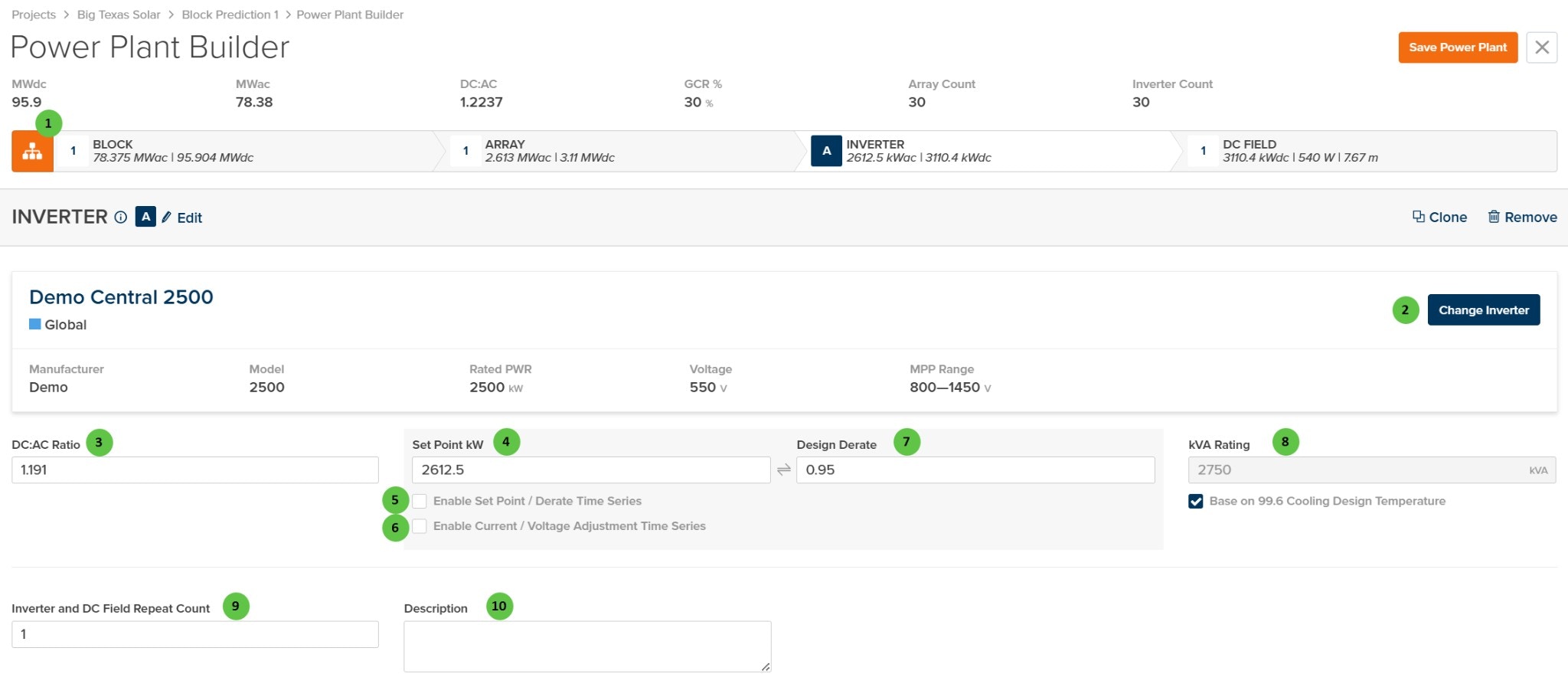
Power Plant Builder - Inverter Page
Overview
The Inverter page is organized into the following sections:- Hierarchy Bar — Shows the current position in the plant hierarchy (Block → Array → Inverter → DC Field) with system capacity summaries.
- Inverter Header — Displays the inverter identifier with Edit, Clone, and Remove buttons.
- Inverter Selection Panel — Shows the currently selected inverter with key specifications (Manufacturer, Model, Rated Power, Voltage, MPP Range).
- Inverter Configuration — Configure DC:AC ratio, power setpoints, derating factors, and kVA rating.
- Repeat Count & Description — Define how many identical inverter/DC Field combinations exist and add optional notes.
User Inputs
| # | Input | Type | Units | Description | Related Documentation |
|---|---|---|---|---|---|
| 1 | Block (Hierarchy) | Button | — | Toggle view to show the hierarchy bar displaying system summary at each level: Block, Array, Inverter, and DC Field. Shows MWdc, MWac, DC:AC ratio, GCR, Array Count, and Inverter Count. | Block Overview |
| 2 | Change Inverter | Button | — | Opens the inverter selection dialog to choose a different inverter model. The panel displays current inverter specifications: Manufacturer, Model, Rated Power (kW), Voltage (V), and MPP Range (V). | Inverter Library, Inverter Models |
| 3 | DC:AC Ratio | Text Field | — | Ratio of DC nameplate power to inverter AC rated power. Automatically calculated from the DC Field capacity and inverter rating. Modifying this value will automatically adjust the number of parallel strings in the DC Field to achieve the target ratio. | — |
| 4 | Set Point kW | Text Field | kW | Maximum AC power output setpoint for the inverter. Used for power curtailment or plant-level power limiting. Linked to Design Derate — editing one updates the other. | Inverter Models |
| 5 | Enable Set Point / Derate Time Series | Checkbox | — | When enabled, allows import of time-varying setpoint or derate values instead of using a fixed value. Useful for modeling curtailment schedules or seasonal power limits. | — |
| 6 | Enable Current / Voltage Adjustment Time Series | Checkbox | — | When enabled, allows import of time-varying current or voltage adjustment values for advanced inverter control modeling scenarios. | — |
| 7 | Design Derate | Text Field | — | Fractional derate factor applied to the inverter rated power (0 to 1). Linked to Set Point kW — editing one updates the other. A value of 0.95 means the inverter operates at 95% of rated capacity. | — |
| 8 | kVA Rating | Text Field | kVA | Apparent power rating of the inverter. When “Base on 99.6 Cooling Design Temperature” is checked, the kVA rating is adjusted based on the site’s design cooling temperature from ASHRAE data. | — |
| 9 | Inverter and DC Field Repeat Count | Text Field | — | Number of identical inverter/DC Field combinations within this Array. Each repeat uses the same inverter model and DC Field configuration. Useful for modeling uniform array sections without duplicating design work. | — |
| 10 | Description | Text Area | — | Optional text field for notes or comments about this inverter configuration. Does not affect simulation results. | — |