

Inverter Library
Overview
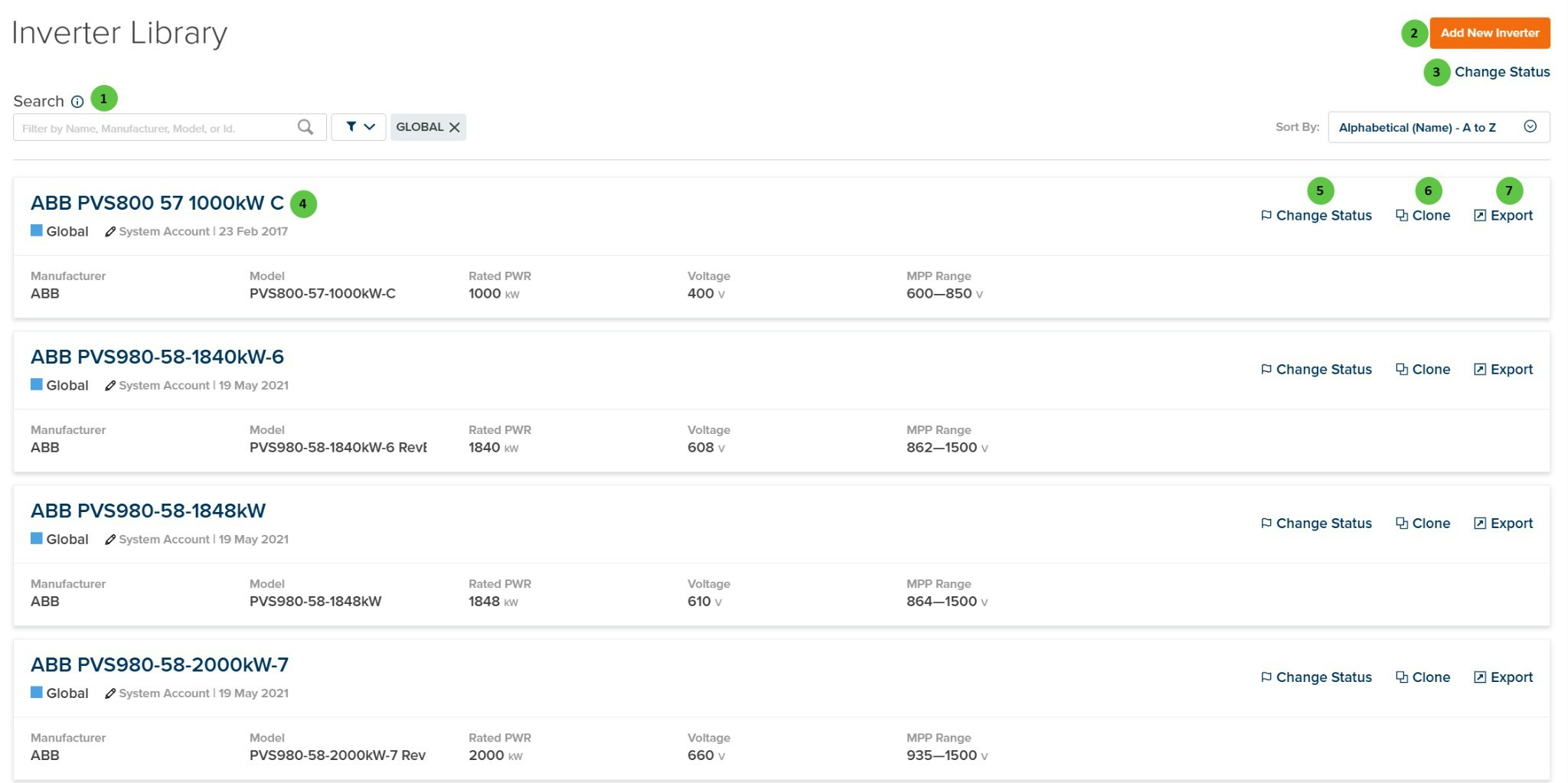
The Inverter Library displays inverter specifications from two sources:- Company Inverters — Custom inverters created or uploaded by users in your organization
- Global Inverters — Manufacturer inverter specifications available to all PlantPredict users
- Manufacturer — Inverter manufacturer name
- Model — Model number or name
- Rated PWR — Rated power (kW)
- Voltage — Output voltage (V)
- MPP Range — Maximum Power Point voltage range (V)
User Inputs
| # | Input | Type | Units | Description | Related Documentation |
|---|---|---|---|---|---|
| 1 | Search | Text Field | — | Search for inverters by name, manufacturer, model, or ID. Filter toggles allow filtering by status (e.g., Global, Active, Draft). Sort options include alphabetical ordering. | — |
| 2 | Add New Inverter | Button | — | Opens the Add New Inverter page where you can upload inverter files (PPI or OND format) or create a custom inverter from scratch. | Add New Inverter |
| 3 | Change Status | Button | — | Bulk status change for selected inverters. Available statuses: Draft Private (visible only to creator), Draft Shared (visible to company), Active (approved for use), Retired (archived), Global (shared with all users), Global-Retired (archived global). | — |
| 4 | Inverter Card | Interactive | — | Click on an inverter card to open the inverter detail view. Each card displays the inverter name, status, owner, last modified date, and key specifications. | Inverter File |
| 5 | Change Status (per inverter) | Button | — | Change the status of an individual inverter. See callout #3 for available status options. | — |
| 6 | Clone (per inverter) | Button | — | Create a copy of the inverter specification. Useful for creating custom variations of existing inverters or Global inverters. | — |
| 7 | Export (per inverter) | Button | — | Export the inverter specification. Available export formats include PPI (PlantPredict native inverter format). | — |
Inverter Statuses
Global Status: Global and Global-Retired statuses are managed exclusively by Terabase Energy. Organizations cannot promote assets to Global status directly. To request that an asset be promoted to Global status, please contact Terabase Energy support.