

Time Series Data is optional. If no data is uploaded, PlantPredict uses its internal models to calculate all time-varying parameters.
Empty State
When no time series data has been uploaded, the page displays an empty state with options to download a template or upload data.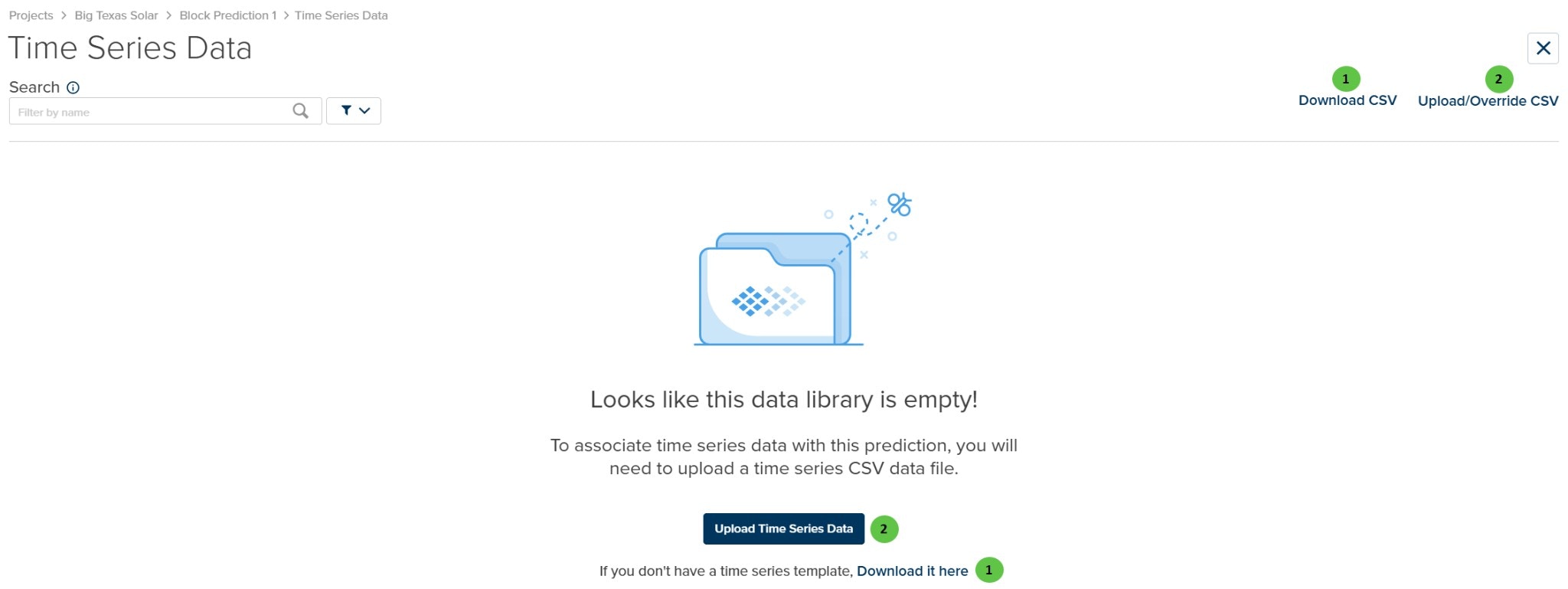
Time Series Data - Empty State
User Inputs (Empty State)
| # | Input | Type | Units | Description | Related Documentation |
|---|---|---|---|---|---|
| 1 | Download CSV | Button | — | Download a CSV template file formatted for time series data upload. The template includes the required timestamp format and column structure. | — |
| 2 | Upload/Override CSV | Button | — | Upload a CSV file containing time series data. If data already exists, this will override it with the new upload. | — |
Loaded State
Once time series data has been uploaded, the page displays data cards organized by parameter type.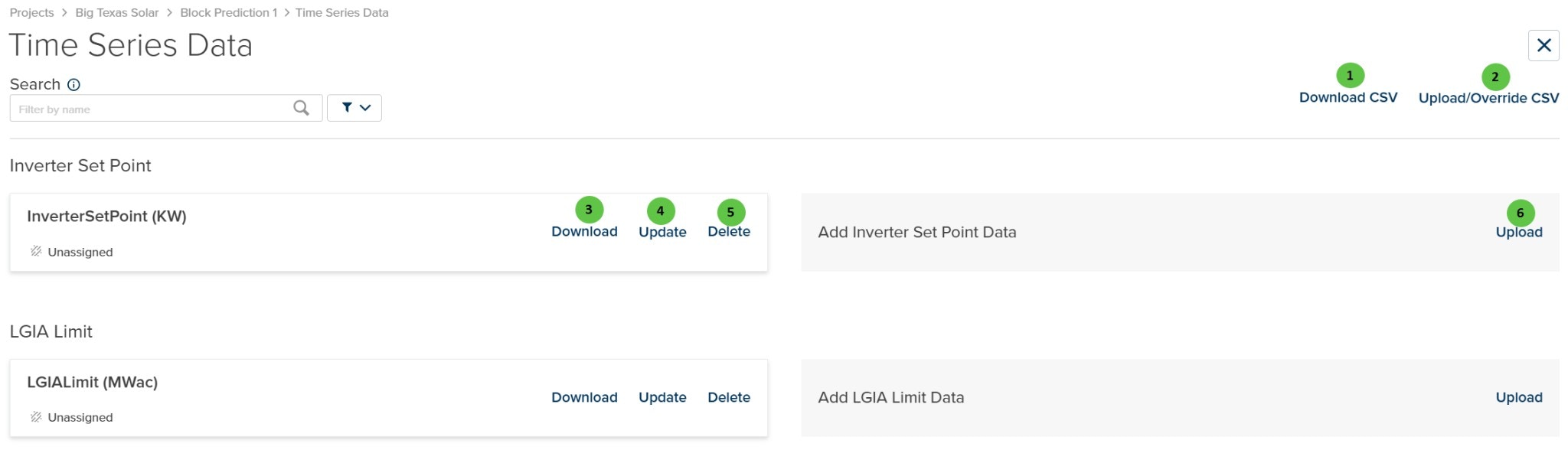
Time Series Data - With Data Uploaded
User Inputs (Loaded State)
| # | Input | Type | Units | Description | Related Documentation |
|---|---|---|---|---|---|
| 1 | Download CSV | Button | — | Download a CSV template or the currently uploaded data. | — |
| 2 | Upload/Override CSV | Button | — | Upload new time series data or override existing data. | — |
| 3 | Download (per data set) | Button | — | Download the specific time series data set as a CSV file. | — |
| 4 | Update (per data set) | Button | — | Update or replace the data for this specific time series parameter. | — |
| 5 | Delete (per data set) | Button | — | Delete the time series data set. | — |
| 6 | Upload (add new data) | Button | — | Upload a new data set for the specified parameter type. | — |
Available Time Series Parameters
The following time series parameters can be uploaded:Assignment Required: After uploading time series data, each data set must be assigned to the appropriate DC Field, Inverter, or Power Plant System. Unassigned data will not be used in predictions.
Workflow
Uploading Time Series Data
- Click Download CSV to get the template file
- Fill in your time series data following the template format
- Click Upload/Override CSV to upload your data
- Review the uploaded data cards
- Assign each data set to the appropriate component (DC Field, Inverter, or System)
Managing Existing Data
- Download: Export the current data for review or modification
- Update: Replace the data with an updated file
- Delete: Remove the time series data set
Data Format Requirements
Time series data must match the timestamps in your weather file:- Timestamp Format: ISO 8601 format (e.g.,
2024-01-01T00:00:00) - Interval: Must match the weather file time step (typically hourly)
- Coverage: Data should span the full prediction period
Related Features
3D Tracker Rotations: Time series data for 3D tracker rotation angles is uploaded separately on the 3D Scene Overview page, not on this Time Series Data page.
- Inverter — Inverter configuration including setpoints and derates
- DC Field - Losses — DC Field loss parameters
- System Details — System-level constraints and limits