

Uncertainty Analysis Configuration
Overview
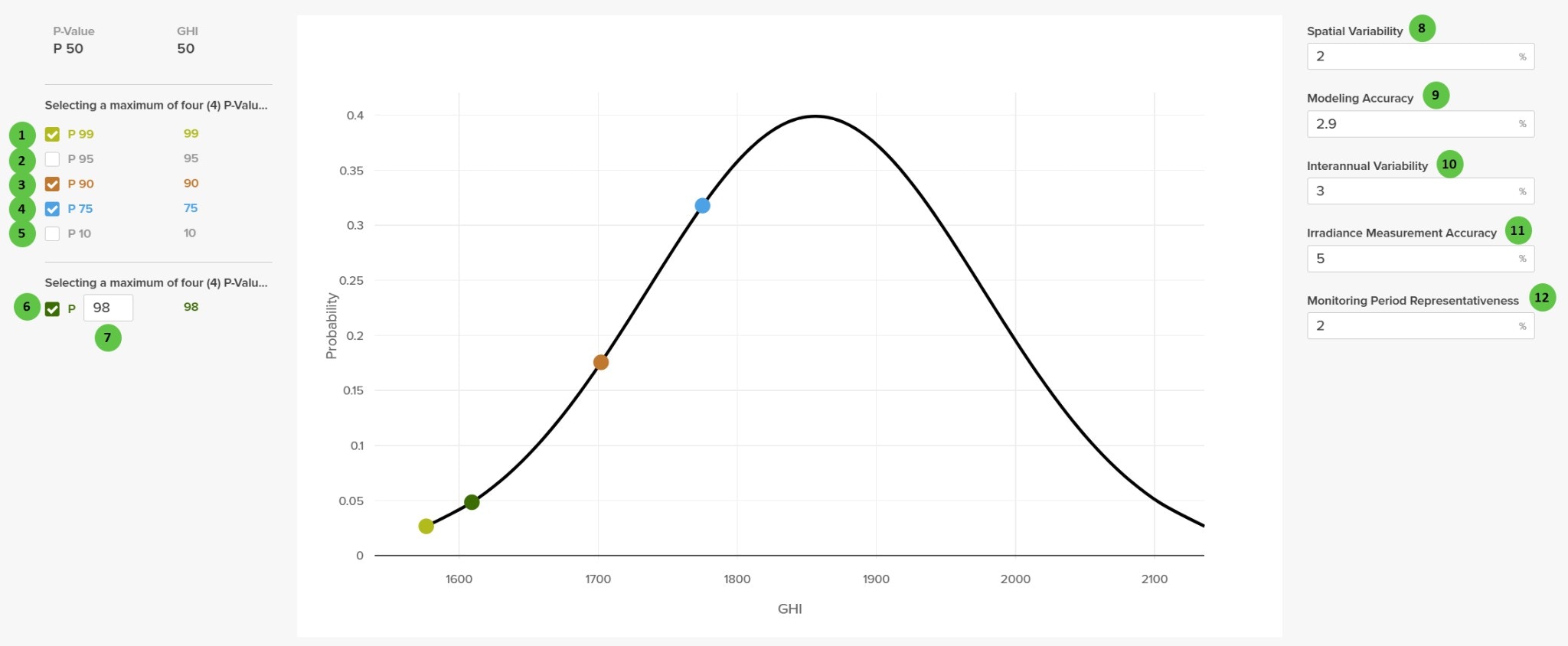
The Uncertainty Analysis page is organized into the following sections:- P-Value Selection — Choose which probability exceedance values to calculate (P99, P95, P90, P75, P10) plus a custom P-value option.
- Probability Distribution Chart — Visual representation of the GHI probability distribution with selected P-values marked.
- Uncertainty Inputs — Define the uncertainty percentages for various input parameters that contribute to the combined uncertainty.
User Inputs (P-Value Selection)
| # | Input | Type | Units | Description | Related Documentation |
|---|---|---|---|---|---|
| 1 | P 99 | Checkbox | — | Include P99 in results. P99 represents the energy value exceeded with 99% probability — a conservative estimate for financing scenarios. | Uncertainty Analysis |
| 2 | P 95 | Checkbox | — | Include P95 in results. P95 represents the energy value exceeded with 95% probability. | Uncertainty Analysis |
| 3 | P 90 | Checkbox | — | Include P90 in results. P90 represents the energy value exceeded with 90% probability — commonly used for debt sizing in project finance. | Uncertainty Analysis |
| 4 | P 75 | Checkbox | — | Include P75 in results. P75 represents the energy value exceeded with 75% probability. | Uncertainty Analysis |
| 5 | P 10 | Checkbox | — | Include P10 in results. P10 represents the energy value exceeded with 10% probability — an optimistic upside estimate. | Uncertainty Analysis |
| 6 | Custom P (Checkbox) | Checkbox | — | Enable a custom probability exceedance value. When checked, enter the desired P-value in the adjacent text field. | — |
| 7 | Custom P (Value) | Text Field | — | Enter a custom probability exceedance percentage (1-99). The corresponding energy value will be calculated and included in results. | — |
A maximum of four (4) P-values can be selected simultaneously. P50 is always calculated and shown as the base case (50% probability of exceedance).
User Inputs (Uncertainty Parameters)
| # | Input | Type | Units | Description | Related Documentation |
|---|---|---|---|---|---|
| 8 | Spatial Variability | Text Field | % | Uncertainty due to differences between the weather data source location and the actual project site. Accounts for micro-climate variations and distance from measurement stations. | Uncertainty Analysis |
| 9 | Modeling Accuracy | Text Field | % | Uncertainty in the energy prediction model itself, including transposition, module performance, inverter efficiency, and loss calculations. | Uncertainty Analysis |
| 10 | Interannual Variability | Text Field | % | Year-to-year variation in solar resource at the site. Represents the natural fluctuation in annual irradiance from typical meteorological conditions. | Uncertainty Analysis |
| 11 | Irradiance Measurement Accuracy | Text Field | % | Uncertainty in the source irradiance data, including sensor calibration, data processing, and satellite-derived irradiance model accuracy. | Uncertainty Analysis |
| 12 | Monitoring Period Representativeness | Text Field | % | Uncertainty in how representative the weather data period is of long-term conditions. Shorter monitoring periods have higher uncertainty. | Uncertainty Analysis |