

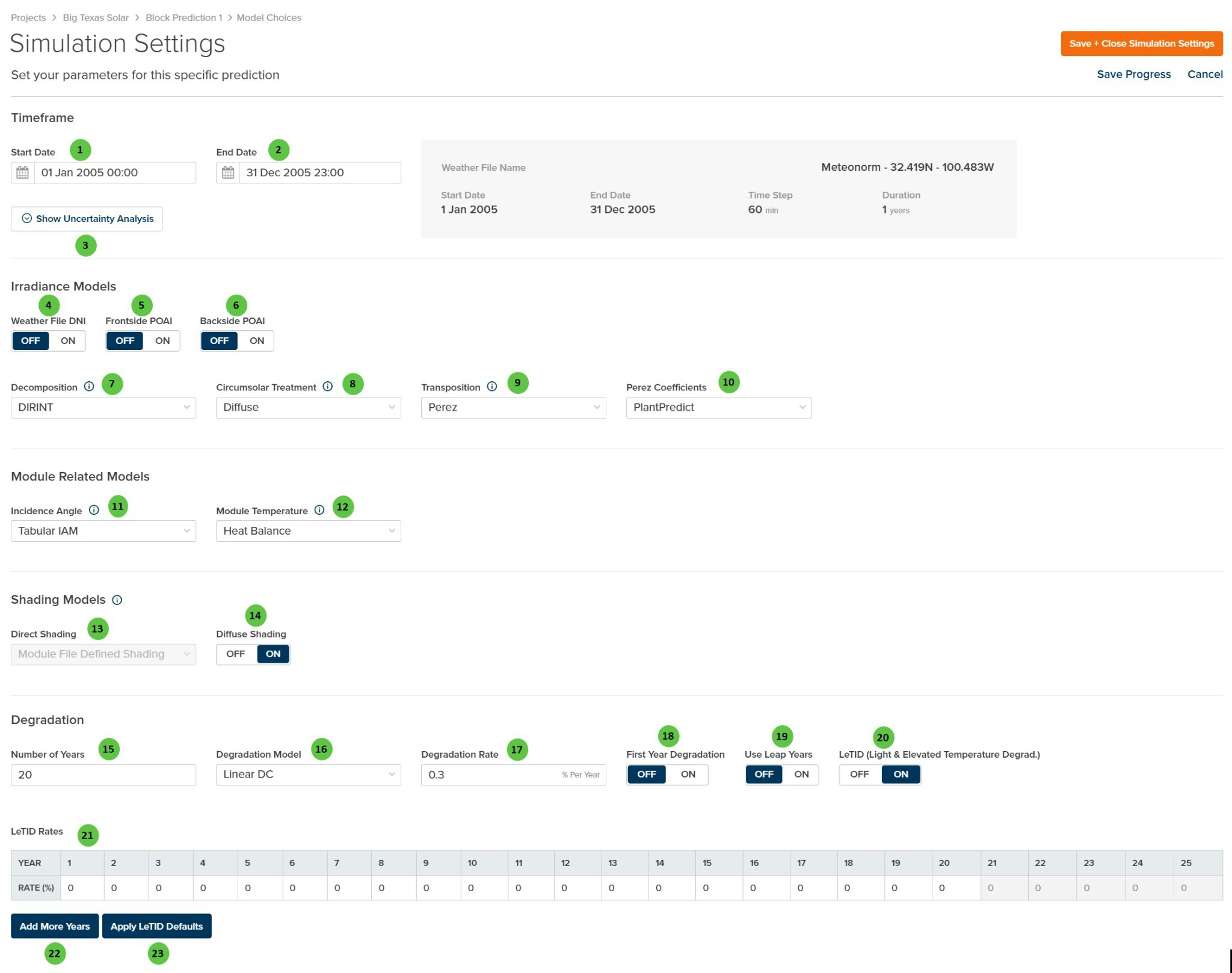
Simulation Settings
Overview
The Simulation Settings page is organized into the following sections:- Timeframe — Set the prediction start and end dates, and access uncertainty analysis configuration. Weather file summary information is displayed for reference.
- Irradiance Models — Select decomposition, transposition, and circumsolar treatment algorithms, plus toggle options for using weather file DNI and pre-calculated POAI values.
- Module Related Models — Choose incidence angle modifier (IAM) and module temperature calculation methods.
- Shading Models — Configure direct and diffuse shading calculation approaches.
- Degradation — Define long-term degradation parameters including annual rates and LeTID modeling.
User Inputs (Timeframe)
| # | Input | Type | Units | Description | Related Documentation |
|---|---|---|---|---|---|
| 1 | Start Date | Date Picker | — | Beginning date and time for the prediction simulation. Must fall within the weather file date range shown in the summary panel. | — |
| 2 | End Date | Date Picker | — | Ending date and time for the prediction simulation. Must fall within the weather file date range shown in the summary panel. | — |
| 3 | Show Uncertainty Analysis | Button | — | Opens the Uncertainty Analysis configuration panel to define P-value selections and uncertainty parameters for probabilistic energy estimates (P50/P90/P99). | Uncertainty Analysis |
- Weather File Name — Name and location coordinates of the loaded weather file
- Start Date / End Date — Date range available in the weather file
- Time Step — Temporal resolution of weather data (e.g., 60 min)
- Duration — Total years of weather data
User Inputs (Irradiance Models)
| # | Input | Type | Units | Description | Related Documentation |
|---|---|---|---|---|---|
| 4 | Weather File DNI | Toggle | — | When ON, uses Direct Normal Irradiance (DNI) values directly from the weather file. When OFF, DNI is calculated from GHI using the selected decomposition model. | Horizontal Irradiance |
| 5 | Frontside POAI | Toggle | — | When ON, uses pre-calculated frontside Plane-of-Array Irradiance from the weather file instead of calculating via transposition models. Horizontal components (GHI, DNI, DHI) are reverse-decomposed from POAI using the GTI-DIRINT algorithm. | POAI Decomposition |
| 6 | Backside POAI | Toggle | — | When ON, uses pre-calculated backside irradiance from the weather file for bifacial modules instead of calculating via the bifacial model. | Bifacial |
| 7 | Decomposition | Dropdown | — | Select the algorithm for decomposing GHI into direct and diffuse components. Options: None, DIRINT, Erbs, Reindl. | Decomposition |
| 8 | Circumsolar Treatment | Dropdown | — | Select how circumsolar radiation is handled in transposition. Diffuse treats circumsolar as part of diffuse; Direct treats it as part of beam irradiance. | Transposition |
| 9 | Transposition | Dropdown | — | Select the transposition model for calculating plane-of-array irradiance from horizontal components. Options: Perez, Hay-Davies. | Transposition Models |
| 10 | Perez Coefficients | Dropdown | — | Select the coefficient set for the Perez transposition model. Options: PlantPredict, All Sites Composite 1990, All Sites Composite 1988, Sandia Composite 1988, or location-specific sets (USA, France, Phoenix, Elmonte, Osage, Albuquerque, Cape Canaveral, Albany). | Perez Model |
User Inputs (Module Related Models)
| # | Input | Type | Units | Description | Related Documentation |
|---|---|---|---|---|---|
| 11 | Incidence Angle | Dropdown | — | Select the Incidence Angle Modifier (IAM) model. Options: None, Tabular IAM, Physical IAM, Sandia, ASHRAE. | Incidence Angle Modifier |
| 12 | Module Temperature | Dropdown | — | Select the module temperature calculation method. Options: Heat Balance, NOCT, Sandia, DC Field Defined. | Module Temperature |
User Inputs (Shading Models)
| # | Input | Type | Units | Description | Related Documentation |
|---|---|---|---|---|---|
| 13 | Direct Shading | Dropdown | — | Select the direct beam shading calculation method. Options: Module File Defined Shading, None, Linear, Fractional Electrical Shading. Note: This field is disabled when a 3D scene has been configured; shading settings are controlled via the 3D Scene Overview page. | Row-to-Row Beam Shading |
| 14 | Diffuse Shading | Toggle | — | When ON, applies diffuse sky shading factors to account for horizon obstruction and row-to-row diffuse blocking. When OFF, no diffuse shading is applied. | Diffuse Shading |
When a 3D Scene is configured for the prediction, the Direct Shading dropdown is disabled. Shading calculations are controlled by the settings in the 3D Scene Overview page, which provides more advanced shading analysis options.
User Inputs (Degradation)
| # | Input | Type | Units | Description | Related Documentation |
|---|---|---|---|---|---|
| 15 | Number of Years | Text Field | years | Total project lifetime for degradation calculations. Determines how many years of degraded energy output are calculated. | — |
| 16 | Degradation Model | Dropdown | — | Select the degradation calculation method. Options: Linear DC, Non-Linear DC, Linear AC, Stepped AC. | Degradation |
| 17 | Degradation Rate | Text Field | % Per Year | Annual degradation rate applied according to the selected model. Typical values range from 0.25% to 0.7% per year for crystalline silicon modules. | Degradation |
| 18 | First Year Degradation | Toggle | — | When ON, applies degradation starting from Year 1. When OFF, Year 1 energy is calculated at full capacity with degradation beginning in Year 2. | — |
| 19 | Use Leap Years | Toggle | — | When ON, accounts for leap years (366 days) in multi-year degradation calculations. When OFF, all years are treated as 365 days. | — |
| 20 | LeTID | Toggle | — | Enable Light and Elevated Temperature Induced Degradation modeling. When ON, applies additional degradation in early years that recovers over time, typical of PERC cells. | — |
| 21 | LeTID Rates | Table | % | Year-by-year LeTID degradation rates. Typically shows elevated degradation in Years 1-3 followed by recovery. Values are editable for each year. | — |
| 22 | Add More Years | Button | — | Extends the LeTID Rates table with additional years beyond the default 25-year period. | — |
| 23 | Apply LeTID Defaults | Button | — | Populates the LeTID Rates table with default values based on typical PERC cell degradation and recovery curves. | — |