June 27, 2024

PlantPredict

New Features and Improvements!

PVC File Export from Map Builder: It is now possible to export a PVC (PV Collada) formatted file from Map Builder! The PVC format is an extension of the Collada standard format with additional information unique to solar PV systems. The PVC format is a standard exchange format which defines the 3D geometry of a PV system and can be read by other industry applications including PVsyst. It is primarily used for 3D shade modeling. Note that it is also possible to upload your own 3D terrain data (via DEM file format) to serve as the underlying surface for the placement of the PV racks within the Map Builder layout. If no user provided terrain data is uploaded, PlantPredict will default to publicly available terrain data.
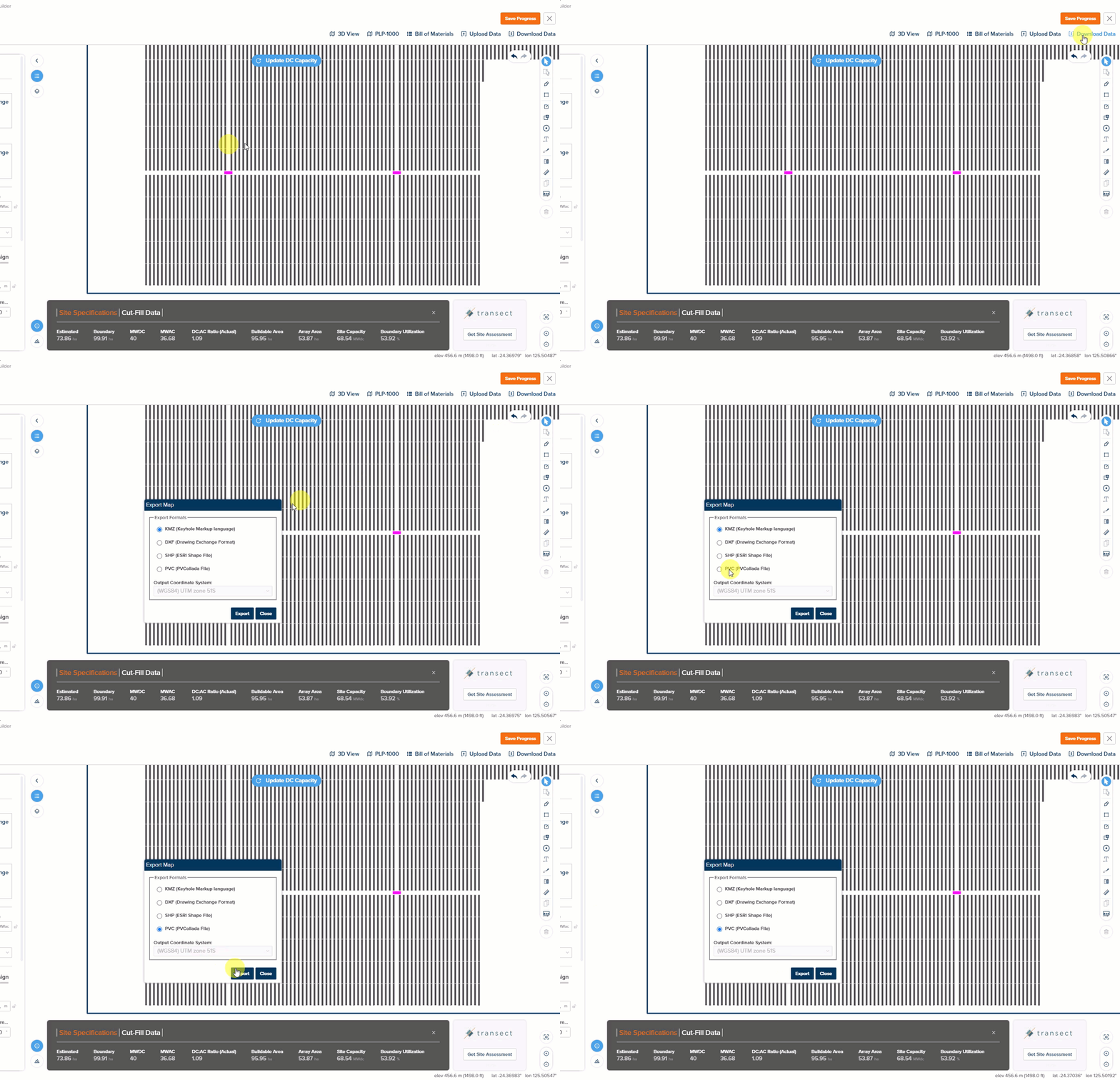
Release 11 29 0 Image1
Map Builder Backtracking Selection: In Map Builder, it is now possible to specify the backtracking method, the same as how it can be done in Block Builder. Company Defaults Improvements: We’ve removed the company defaults for Tracking Algorithm and Module Orientation. These will now default to the values set within the module file (but can still be overwritten in the Prediction). This reduces confusion as to the source of truth for defaults for these parameters.

Bug Fixes

Error Message Fixes: Changing a Prediction from Draft-Private will no longer return an erroneous error message if the weather file status was also updated. DC Field Modules High/Modules Wide Calculation Bug: Fixed a bug in the DC Field page where the Number of Modules High and Number of Modules Wide were calculated incorrectly.

Design Pro

New Features and Improvements!

Improvements to the 1P Multi-String UI: The User Interface for the 1P Multi-String racking definition has been updated to group the inputs more intuitively. An additional parameter has been added: “TT-Extension” (Torque-Tube-Extension) and additional informational graphics have been added to explain the inputs in more detail.
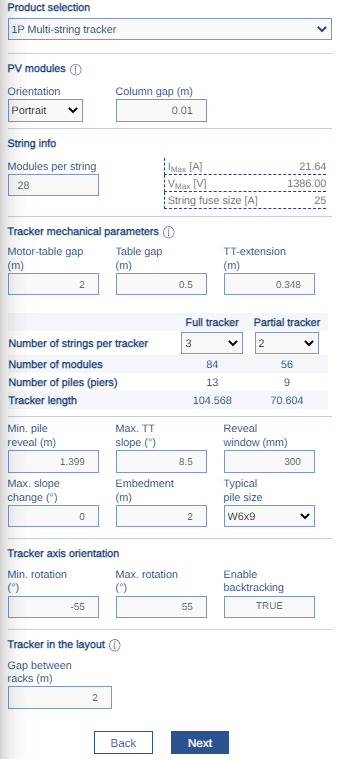
Release 11 29 0 Image2
Compare Window Improvements: We continue to make improvements to the Scenario Comparison feature. Several new fields have been added and several labels have been renamed. Grading Analysis of Unused Racks: Prior to this release, Design Pro layouts sent to Terrain Pro for grading analysis included “Unused Racks” (identified as gray color in layout). This is no longer the case and unused racks are no considered in the Terrain Pro grading analysis.

Voltage Pro

Bug Fixes

Module / Inverter Filtering Bug: Fixed a bug where modules and inverters would fail to filter if the user opened a cloned calculation from the parent page. Calculation Failures due to Private Assets: Where Draft-Private assets were selected for weather, module or inverters within a Voltage Pro calculation, these could result in failed calculations. New protections have been implemented to prevent calculations from being submitted with Draft-Private assets. Duplicate Weather ID Bug: Fixed a bug where duplicate weather IDs were displayed in the weather file selection dropdown menu.