

PlantPredict
New Features and Improvements!
Import Process Enhancements: You can now import predictions with assets of any status. If an import lacks necessary weather details, an error message will guide you to the import wizard on the project screen where a new weather file can be selected. PVPlanner Reinstatement: Responding to your feedback, we’ve temporarily reinstated the PVPlanner functionality, an essential tool for managing SolarGIS weather file downloads. This update ensures you can continue to utilize SolarGIS data effectively in your PV project planning. We previously removed this feature following vendor deprecation, but have brought it back to accommodate your current needs. For further details on this change and what to expect in the future, please check out the SolarGIS guide on transitioning to the Prospect app. Educational Tooltips: New informational icons have been added across various pages to guide you through the platform’s features. On the Environmental Conditions page, icons next to spectral behavior, horizon scene, soiling, and air mass, and on the Block Builder page next to transformer and inverter sections, will direct you to detailed help pages for better understanding. Error Handling Improvements: We’ve implemented more detailed and instructive error messages in the weather download functionality to help you navigate issues more effectively.Bug Fixes
Improved Handling of Constraint Setbacks: In Map Builder, we’ve corrected two issues associated with constraint setback. First, the DC Flood now respects linear and point constraints where no setbacks have been applied. Prior to this release, linear and point constraints without setbacks were not respected in the DC Flood. Now, Linear and Point Constraints will be avoided, even if no setback is applied. Second, we fixed an error where point constraint setback distances were being applied incorrectly. Stability Fixes in Map Builder: A previously encountered bug preventing the saving of the Backside Mismatch in Map Builder has been resolved. Additionally, we’ve added functionality to lock this field in both the Map Builder and Block Builder predictions for more robust data integrity. Project Import Error Fix: The bug that caused errors during the selection of a new ASHRAE station in the project import process has been addressed, ensuring a smoother project setup. Fixed Tilt Compatibility in Physical IAM: We’ve addressed the issue where Physical IAM (Incident Angle Modifier) was not functioning correctly with fixed tilt systems. This fix ensures that the IAM calculations now properly integrate with all fixed tilt configurations, enhancing the accuracy of performance predictions for these setups.- Time series inputs can now be unassigned and deleted.
- Corrected an issue within the DC Field 3D Visualization/Editor.
Design Pro
New Features and Improvements!
Scenario Comparison Improvements: We’ve greatly improved and re-formatted the scenario data that can be compared between multiple scenarios after a simulation has run. In the past, it’s been difficult to recall the user selections and inputs that have led to a set of simulation outputs. This has especially been true of the system targets set in the Scenario Analysis page (Target GCR, Capacity, DC/AC, etc.). Now these selections are retained after the simulation has run and can be compared against other scenarios within the same simulation or across multiple simulations.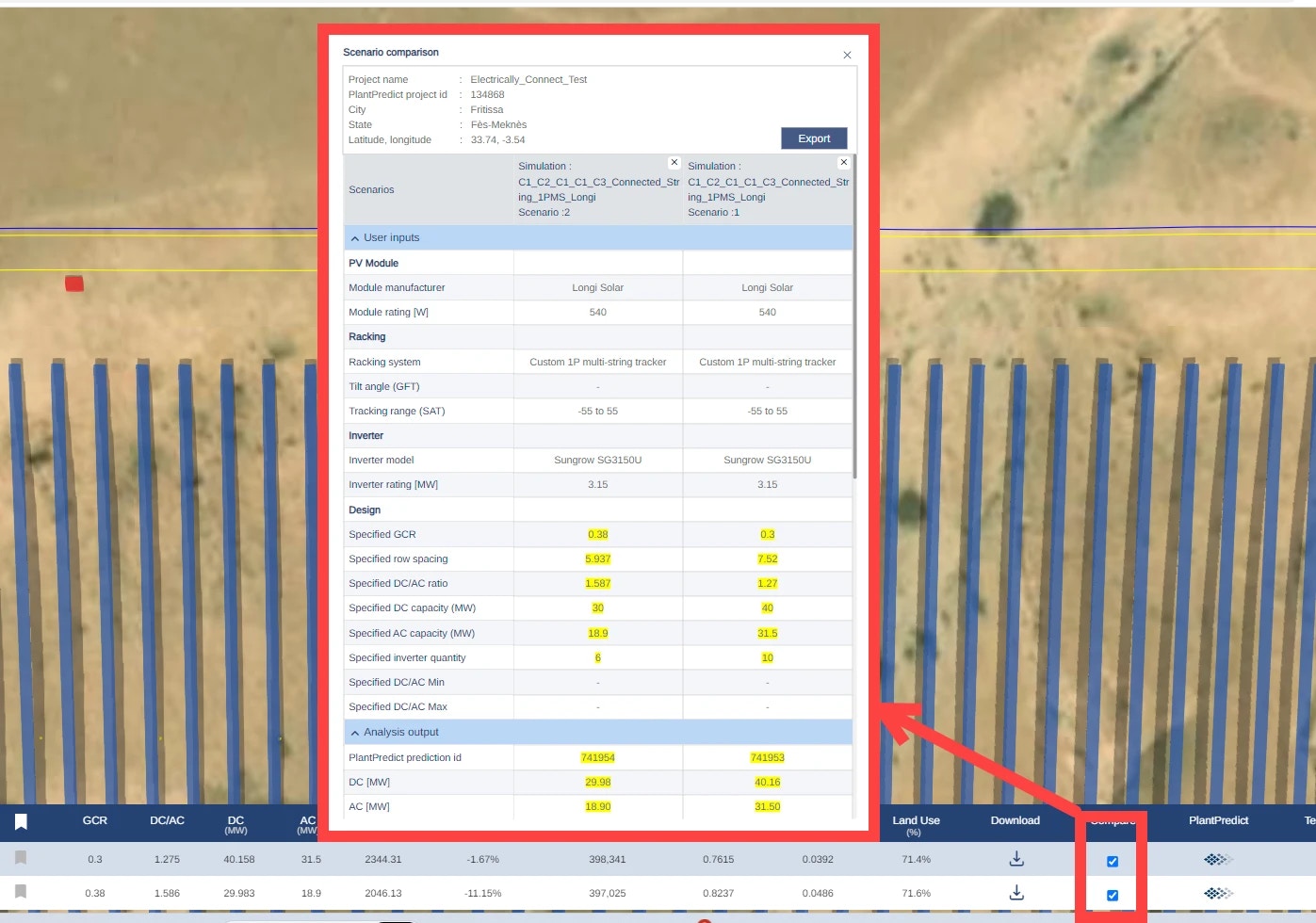
Bug Fixes
- Fixed an issue where switching tabs between Site Plan/Team/Technical support and returning to the Simulation page led to the disappearance of the site boundary.
- Fixed an issue where the result table, render icon, and array layout pdf icon were sometimes not visible.
- Fixed an icon rendering issue where the equipment backgrounds were misaligned on the Equipment Quick Configuration page.
- Fixed an issue causing the full tracker and partial tracker number of string options to be loaded with “Not Available” text on the 1P multistring tracker configuration page.