A PlantPredict weather file contains time-series meteorological data required for energy predictions. Weather files are organized across three tabs for viewing summary statistics, interactive charts, and raw data.

Tab Overview

TabDescription
SummaryAnnual totals, averages, station metadata, and data source information
ChartsInteractive time-series visualization of weather variables
Raw DataComplete time-series data table with all weather parameters

Header Actions

ActionDescription
Save WeatherSave changes to the weather file
MapView the weather station location on a map
Change StatusChange the weather file status
Quality CheckRun data quality validation checks
ExportExport the weather file
DeleteDelete the weather file

Summary Tab

The Summary tab displays aggregated statistics and metadata for the weather file.
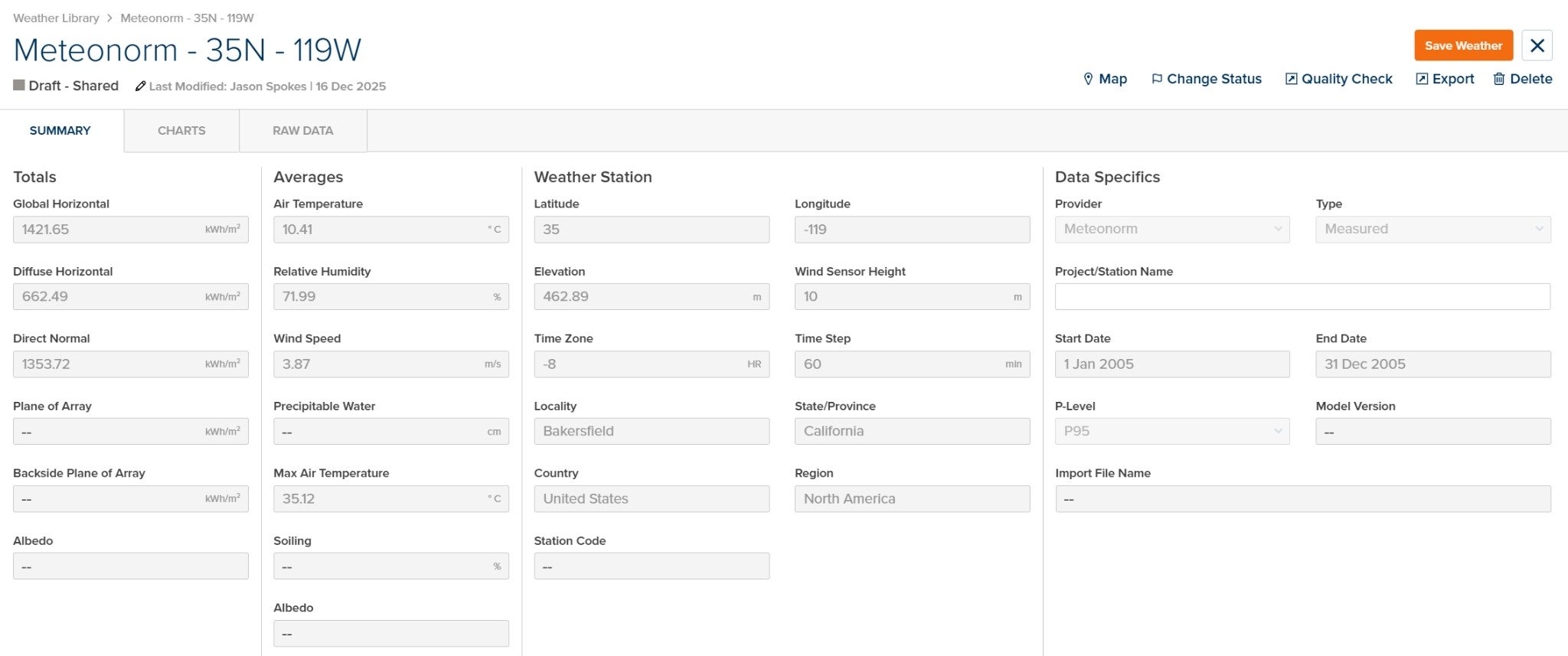
Weather File Summary

Weather File - Summary Tab

Totals

Annual irradiance totals calculated from the time-series data.
ParameterUnitsDescription
Global HorizontalkWh/m²Total Global Horizontal Irradiance (GHI)
Diffuse HorizontalkWh/m²Total Diffuse Horizontal Irradiance (DHI)
Direct NormalkWh/m²Total Direct Normal Irradiance (DNI)
Plane of ArraykWh/m²Total Plane of Array Irradiance (if available)
Backside Plane of ArraykWh/m²Total rear-side irradiance for bifacial systems (if available)
AlbedoAverage ground reflectance (if available)

Averages

Annual average values for meteorological parameters.
ParameterUnitsDescription
Air Temperature°C / °FAverage ambient air temperature
Relative Humidity%Average relative humidity
Wind Speedm/s / ft/sAverage wind speed
Precipitable Watercm / inAverage precipitable water in atmosphere
Max Air Temperature°C / °FMaximum recorded air temperature
Soiling%Average soiling loss (if available)
AlbedoAverage ground albedo (if available)

Weather Station

Location and metadata for the weather data source.
ParameterUnitsDescription
Latitude°Station latitude (positive = North)
Longitude°Station longitude (positive = East)
Elevationm / ftStation elevation above sea level
Time ZonehrUTC offset for timestamps
Time StepminData interval (e.g., 60 = hourly)
LocalityCity or locality name
State/ProvinceState or province
CountryCountry
RegionGeographic region
Station CodeWeather station identifier (if applicable)

Data Specifics

Information about the data source and file properties.
ParameterUnitsDescription
ProviderWeather data provider (e.g., Meteonorm, SolarAnywhere, NSRDB)
TypeData type (Measured, Satellite-derived, TMY, etc.)
Project/Station NameName or identifier for the project or station
Start DateFirst timestamp in the data
End DateLast timestamp in the data
P-LevelProbability level (e.g., P50, P90, P95)
Model VersionProvider model version (if applicable)
Import File NameOriginal filename when imported

Charts Tab

The Charts tab provides interactive visualization of weather data time-series.
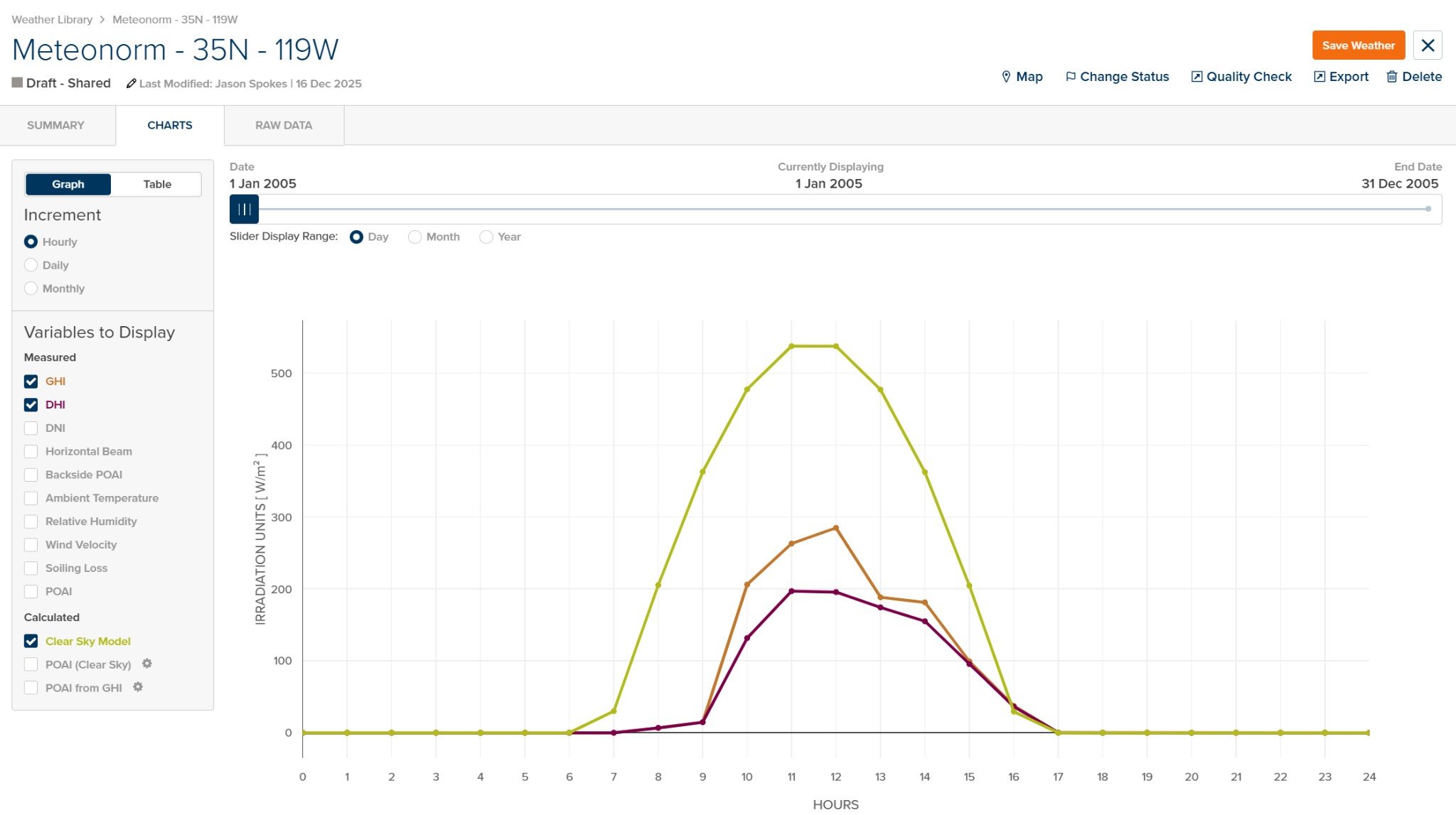
Weather File Charts

Weather File - Charts Tab

Display Options

ElementDescription
Graph / TableToggle between graphical chart and tabular data view
Date Range SliderAdjust the displayed time range within the dataset
Slider Display RangeSelect time scale: Day, Month, or Year

Increment

Select the data aggregation level for display:
OptionDescription
HourlyDisplay hourly data points
DailyAggregate and display daily values
MonthlyAggregate and display monthly values

Variables to Display

Measured Variables:
VariableUnitsDescription
GHIW/m²Global Horizontal Irradiance
DHIW/m²Diffuse Horizontal Irradiance
DNIW/m²Direct Normal Irradiance
Horizontal BeamW/m²Horizontal beam irradiance
Backside POAIW/m²Rear-side Plane of Array Irradiance
Ambient Temperature°C / °FAmbient air temperature
Relative Humidity%Relative humidity
Wind Velocitym/s / ft/sWind speed
Soiling Loss%Soiling loss factor
POAIW/m²Plane of Array Irradiance
Calculated Variables:
VariableUnitsDescription
Clear Sky ModelW/m²Calculated clear sky irradiance for comparison
POAI (Clear Sky)W/m²Clear sky Plane of Array Irradiance
POAI from GHIW/m²POA calculated from GHI using transposition models
Use the Clear Sky Model overlay to identify potential data quality issues such as time shifts, sensor errors, or cloud enhancement events. Measured values significantly exceeding clear sky suggest data anomalies.

Raw Data Tab

The Raw Data tab displays the complete time-series data in tabular format.
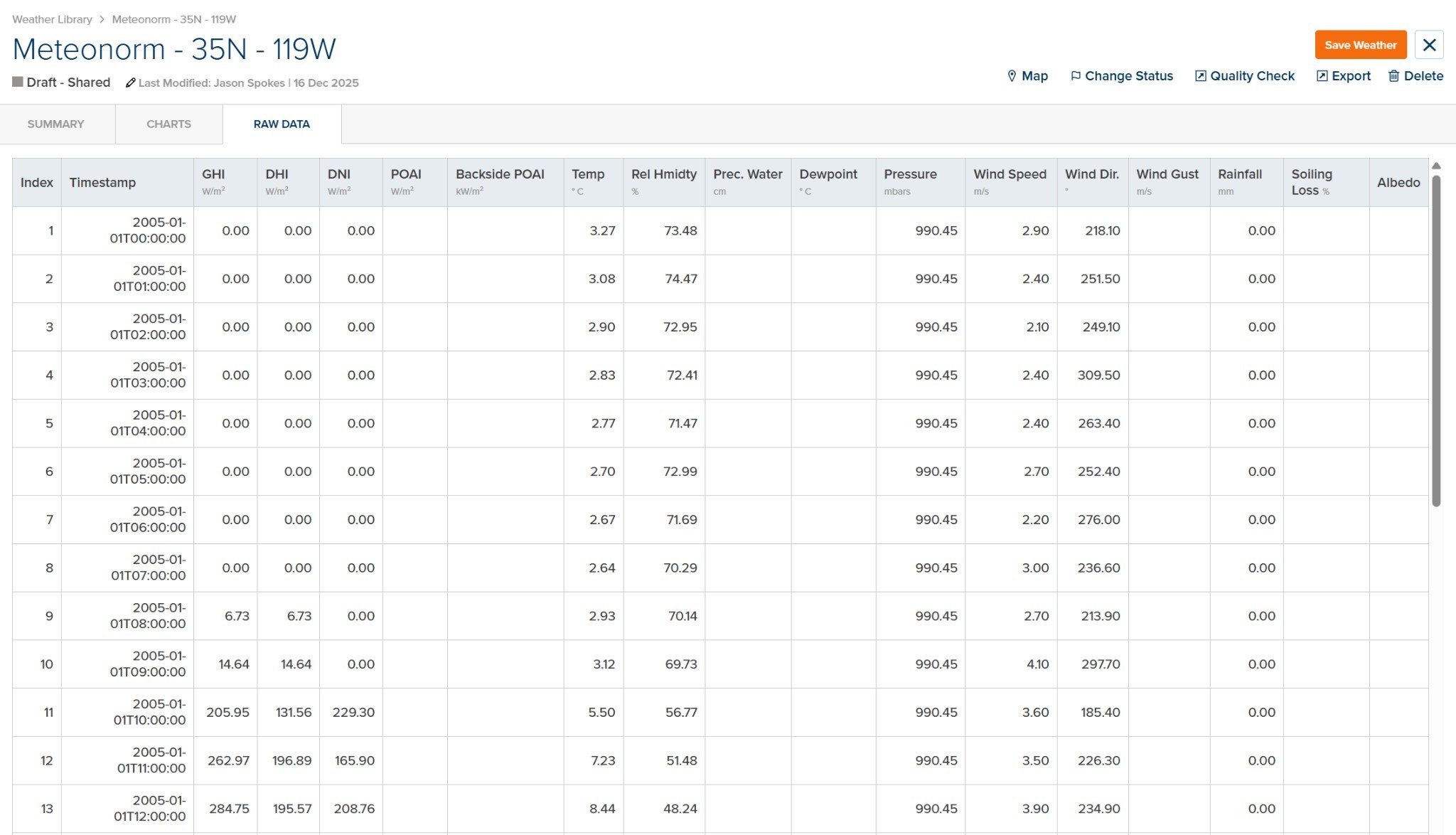
Weather File Raw Data

Weather File - Raw Data Tab

Data Columns

ColumnUnitsDescription
IndexRow number
TimestampDate and time (ISO 8601 format)
GHIW/m²Global Horizontal Irradiance
DHIW/m²Diffuse Horizontal Irradiance
DNIW/m²Direct Normal Irradiance
POAIkW/m²Plane of Array Irradiance
Backside POAIkW/m²Rear-side Plane of Array Irradiance
Temp°C / °FAmbient temperature
Rel Hmdty%Relative humidity
Prec. Watercm / inPrecipitable water
Dewpoint°C / °FDewpoint temperature
PressurembarsAtmospheric pressure
Wind Speedm/s / ft/sWind speed
Wind Dir.°Wind direction
Wind Gustm/s / ft/sMaximum wind gust
Rainfallmm / inPrecipitation
Soiling Loss%Soiling loss factor
AlbedoGround reflectance
Not all columns will contain data for every weather file. Available parameters depend on the data source and provider. Columns without data will display as empty or with placeholder values.

Data Quality Considerations

When reviewing weather files, consider the following:
CheckDescription
GHI vs Clear SkyGHI should not consistently exceed clear sky values
DHI + DNI ≈ GHIComponent irradiances should sum approximately to GHI
Time AlignmentIrradiance peaks should align with solar noon
Temperature RangeTemperatures should be reasonable for the location and season
Missing DataCheck for gaps or extended periods of zero values
Use the Quality Check button in the header to run automated data validation checks on the weather file.