PlantPredict
New Features & Updates!
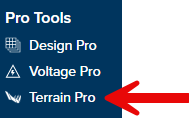
- Direct Access to Terrain Pro - A new Terrain Pro link has been added to the PlantPredict Navigation Column (for Pro and Enterprise tier users):
- Improved PPP and PPD Import Process - Mapping modules and inverters within PPP and PPD files to existing module and inverter assets is now easier. During the module and inverter import process, when clicking the “Review Options” button, PlantPredict will automatically search for modules or inverters which match the naming of the module or inverter within the PPP or PPD file.
- Support of Timeseries Data within SDK - We’ve updated the PlantPredict SDK to support the handling of Timeseries data within predictions.
Bug Fixes
- Fixed an issue with the 3D shade scene in Version 12 where the site layout/geometry and shade simulation results would be lost when navigating away from and back to the shade scene page.
- Improved Timeseries data compatibility screening during the upload process. Warnings were previously displayed unnecessarily. The upload process is now more flexible and only requires the same number of time steps as present in the weather file.
- Fixed a plotting issue within the weather data page so that the data plotted matches the raw data for each timestep. Previously, some conversions were applied to sub-hourly irradiance data to display in kWh/m^2. We know display in W/m^2 so that the plotted data matches the raw data set.
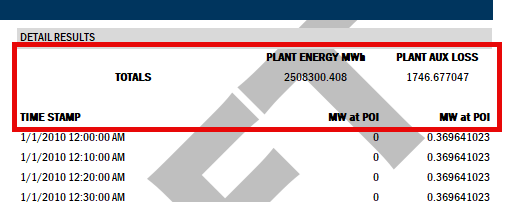
- Changed the headings on the 8760 Export files to better represent the data being provided and avoid confusion. Specifically, the Units have been changed from “MWh at POI” to “MW at POI” since sub-hour data timesteps are not divided by the number of timesteps per hour:
- Improved batch prediction progress notifications. When running batch predictions, the status would oscillate between “In Progress” and “Pending”. This has been improved.
- In the Module File Definition, the Dark Shunt Resistance field validation has been increased from 100,000 Ohms to 1,000,000 Ohms to align with the API validation.
Design Pro
Bug Fix
Max TT Axis Slope Value Customization Now Supported in Design Pro
Feature Update:The maximum TT axis slope value can now be customized in Design Pro and accurately passed through to Terrain Pro for analysis. Previously, this value defaulted to 8.5 degrees due to a hardcoded setting, regardless of user input. With this update, users have full control over the max TT axis slope value, which will apply to both
max_tt_axis_slope_north and max_tt_axis_slope_south in Terrain Pro as specified.
Key Fixes:
- Removed the hardcoded max TT axis slope default of 8.5 degrees.
- Enabled Design Pro to accept user-defined max TT axis slope values.
- Ensured that Terrain Pro reflects the user-entered value in both the north and south axis slope configurations.
This improvement provides more flexibility in design and analysis, allowing for accurate slope configuration based on specific project requirements. Users can now ensure that their custom max TT axis slope values are respected throughout the entire workflow.
Site Boundary Character Encoding Issue Fixed in Design Pro Simulation
Bug Fix:Resolved a critical issue where simulations would fail when processing site boundaries with certain naming patterns. Previously, character encoding limitations in the database could cause simulation failures when processing layouts with specific boundary names during electrical connectivity calculations. Key Fixes:
- Updated database character encoding to UTF-8
- Enhanced boundary name processing during KML imports
- Improved data validation for site boundary details
Users can now successfully run simulations with any boundary naming convention, ensuring reliable processing of all site layouts regardless of the boundary names used.
Terrain Pro
New Features & Updates!
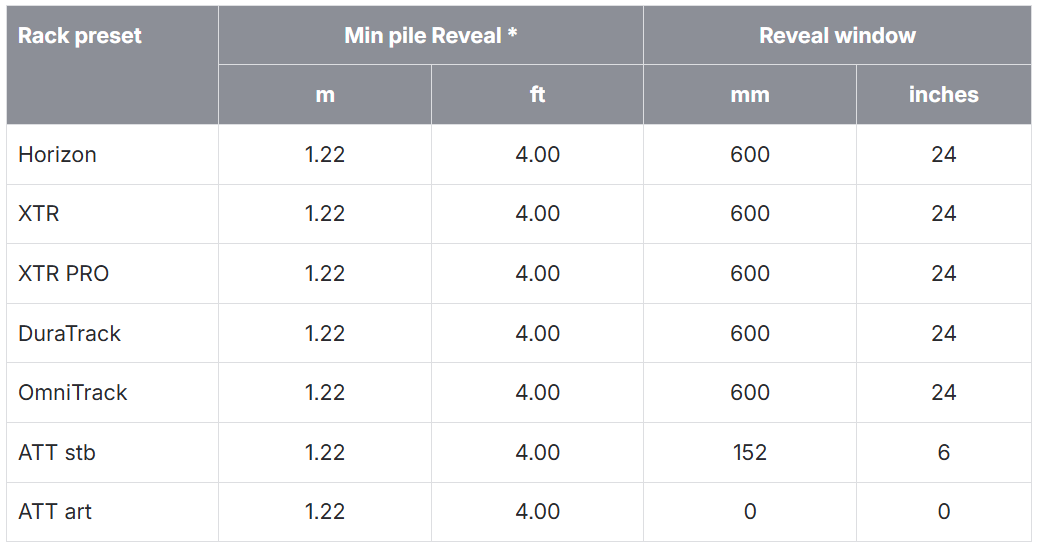
Updated input parameters values for preset rack configurations
All the Minimum Pile Reveal and the Reveal windows parameters have been updated as indicated in the table below: