

Quality Check is now available when doing a one-click weather download
We have been focusing on improving our Weather Import features for PlantPredict Premium subscribers. Last release we introduced Solcast as a new weather data provider. This release we incorporated the Quality Check feature when using the 1-click weather import. Certain places around the world have time zones that don’t always align with our weather providers. You now have a chance to review the weather data and apply a time shift to ensure that the weather data you are importing aligns with the solar time zone at the location you are modeling. This quality check has been a part of the weather file upload for a long time, so we just implemented it in the 1-click weather download process, since it is proven to work very well. After the weather data has downloaded, you are taken to a Quality Check screen to review and shift data if needed.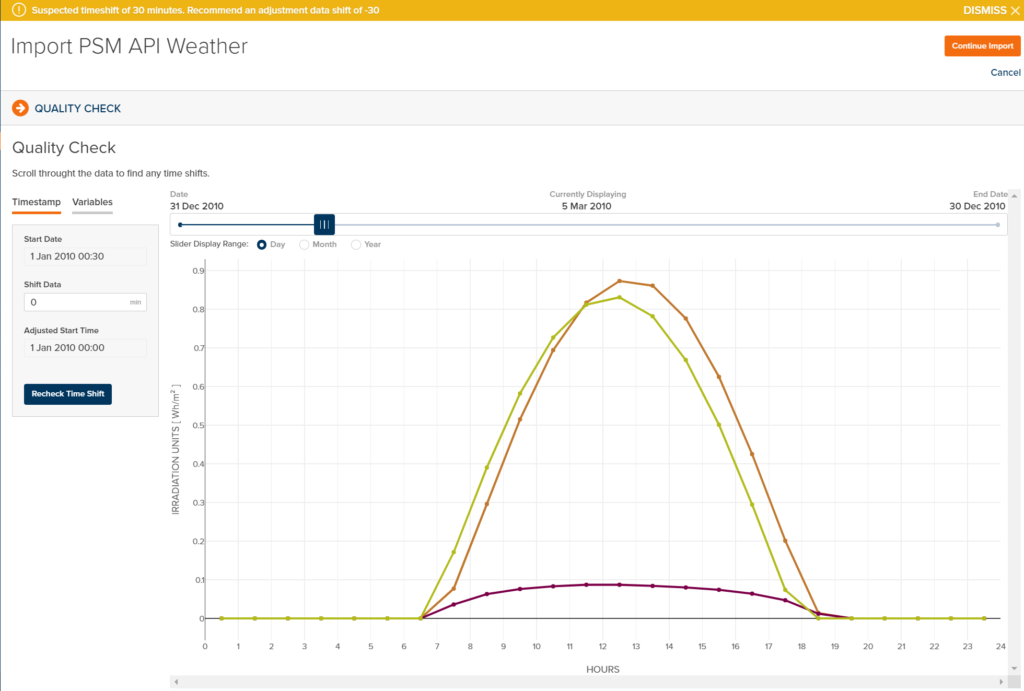
- Fixed header row styling when importing weather. Previously, the header was shown incorrectly and over the top of data.
- Within MapBuilder, saving the prediction would fail if a constraint was selected that had no label.