

- Financial Modeling is NOW available in PlantPredict for PlantPredict Premium Subscribers only.
- Today we released our Version 1 Financial Model, which is a simple model that establishes a foundation that we can build upon to create a more sophisticated model over time.
- After running a Prediction, you will notice a new button next to the View Results button and this is where you will want to go to do your Financial Modeling
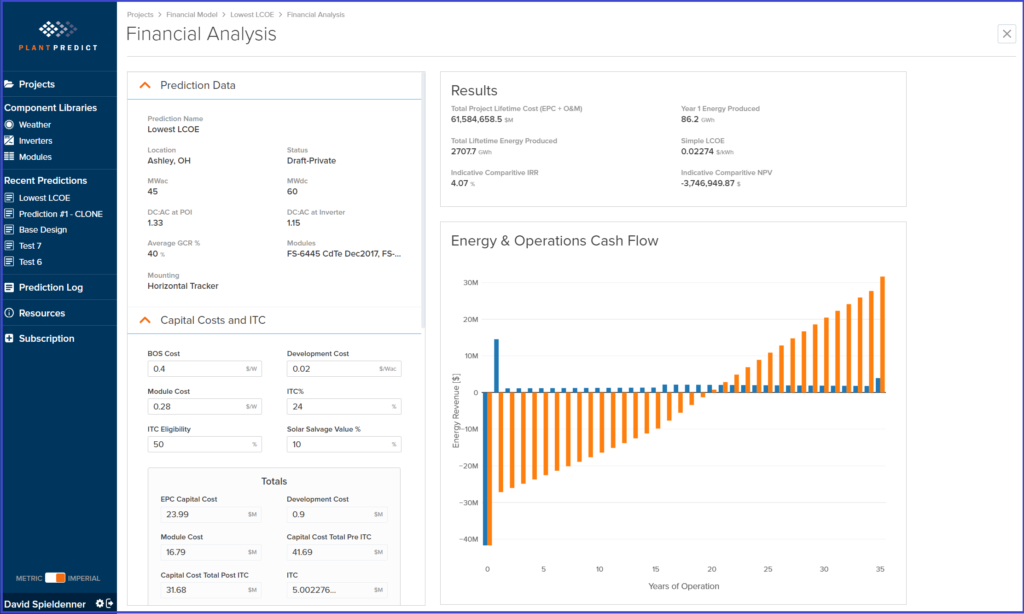
- Quickly calculate Levelized Cost of Electricity (LCOE), Internal Rate of Return (IRR) and Net Present Value (NPV) using your energy prediction results and input parameters that you can control.
- 25 different Input Parameters allow you to adjust important variables such as BOS Cost, Module Cost, Investment Tax Credit, PPA Pricing, O&M Costs, Federal, State and Local Taxes just to name a few.
- Results are displayed as Key Performance Indicators, as well as, a cash flow graph that shows you the annual cash flows, along with the cumulative cash flows associated with your project.
- Company Administrators can define default Financial Model Input Parameters for their company
- If you don’t like the general defaults that we have established, your company administrator can go into your Company Settings and update the Financial Analysis default settings.
- Meteonorm hot fix to ensure all meteonorm weather files are available to PlantPredict Premium subscribers, even those that were downloaded prior to last month’s release.
- Removed the restriction so that now all module cell technologies can be modeled as bifacial modules.