 ## Overview
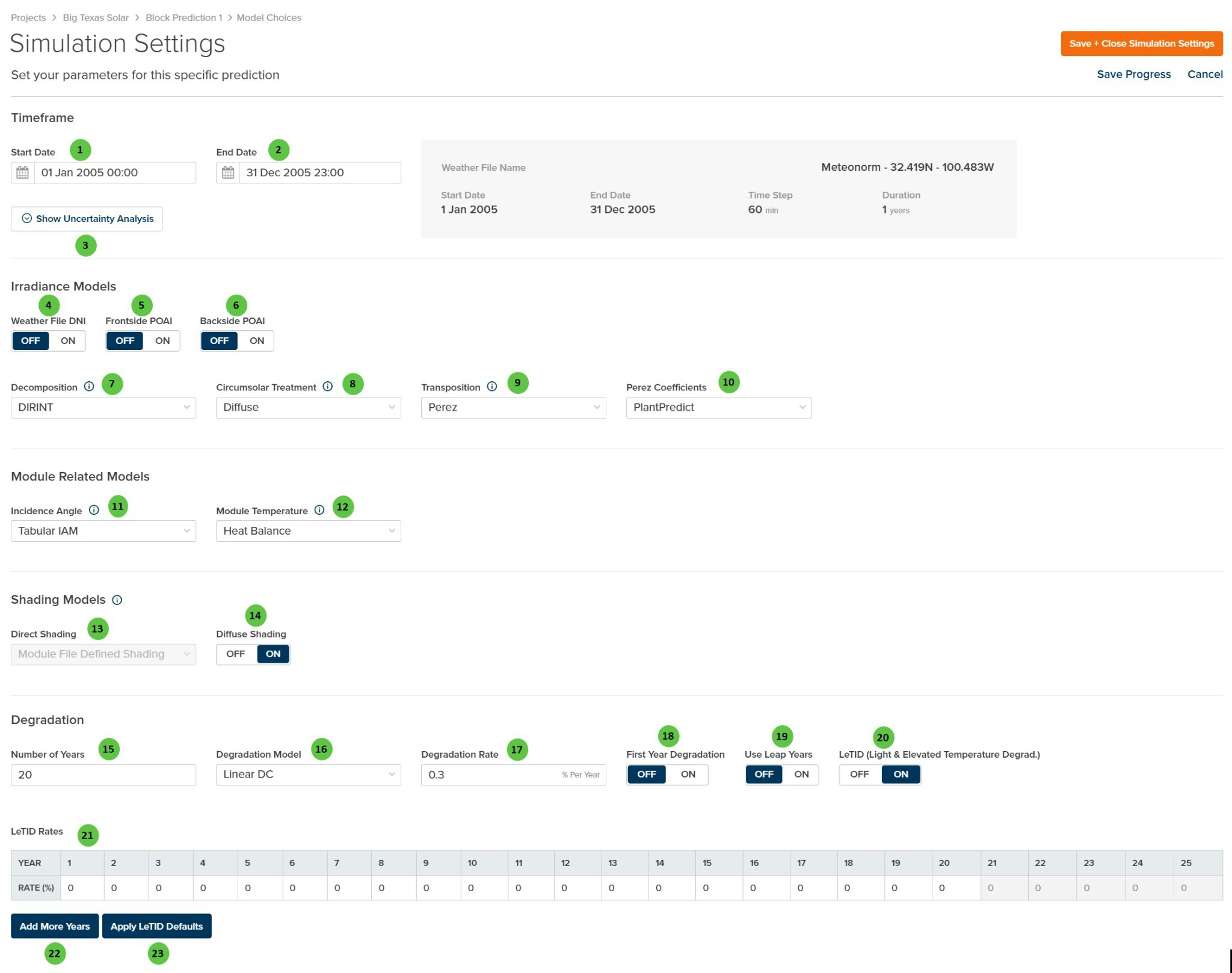
The Simulation Settings page is organized into the following sections:
1. **Timeframe** — Set the prediction start and end dates, and access uncertainty analysis configuration. Weather file summary information is displayed for reference.
2. **Irradiance Models** — Select decomposition, transposition, and circumsolar treatment algorithms, plus toggle options for using weather file DNI and pre-calculated POAI values.
3. **Module Related Models** — Choose incidence angle modifier (IAM) and module temperature calculation methods.
4. **Shading Models** — Configure direct and diffuse shading calculation approaches.
5. **Degradation** — Define long-term degradation parameters including annual rates and LeTID modeling.
***
## User Inputs (Timeframe)
## Overview
The Simulation Settings page is organized into the following sections:
1. **Timeframe** — Set the prediction start and end dates, and access uncertainty analysis configuration. Weather file summary information is displayed for reference.
2. **Irradiance Models** — Select decomposition, transposition, and circumsolar treatment algorithms, plus toggle options for using weather file DNI and pre-calculated POAI values.
3. **Module Related Models** — Choose incidence angle modifier (IAM) and module temperature calculation methods.
4. **Shading Models** — Configure direct and diffuse shading calculation approaches.
5. **Degradation** — Define long-term degradation parameters including annual rates and LeTID modeling.
***
## User Inputs (Timeframe)
| # | Input | Type | Units | Description | Related Documentation |
|---|---|---|---|---|---|
| **1** | **Start Date** | Date Picker | — | Beginning date and time for the prediction simulation. Must fall within the weather file date range shown in the summary panel. | — |
| **2** | **End Date** | Date Picker | — | Ending date and time for the prediction simulation. Must fall within the weather file date range shown in the summary panel. | — |
| **3** | **Show Uncertainty Analysis** | Button | — | Opens the [Uncertainty Analysis](/user-guide/ui/uncertainty-analysis) configuration panel to define P-value selections and uncertainty parameters for probabilistic energy estimates (P50/P90/P99). | [Uncertainty Analysis](/user-guide/ui/uncertainty-analysis) |
| # | Input | Type | Units | Description | Related Documentation |
|---|---|---|---|---|---|
| **4** | **Weather File DNI** | Toggle | — | When **ON**, uses Direct Normal Irradiance (DNI) values directly from the weather file. When **OFF**, DNI is calculated from GHI using the selected decomposition model. | [Horizontal Irradiance](/models/horizontal-irradiance/horizontal_irradiance_components) |
| **5** | **Frontside POAI** | Toggle | — | When **ON**, uses pre-calculated frontside Plane-of-Array Irradiance from the weather file instead of calculating via transposition models. Horizontal components (GHI, DNI, DHI) are reverse-decomposed from POAI using the GTI-DIRINT algorithm. | [POAI Decomposition](/models/horizontal-irradiance/poai_diffuse_direct_decomposition) |
| **6** | **Backside POAI** | Toggle | — | When **ON**, uses pre-calculated backside irradiance from the weather file for bifacial modules instead of calculating via the bifacial model. | [Bifacial](/models/poa-irradiance/rear_irradiance) |
| **7** | **Decomposition** | Dropdown | — | Select the algorithm for decomposing GHI into direct and diffuse components. Options: **None**, **DIRINT**, **Erbs**, **Reindl**. | [Decomposition](/models/horizontal-irradiance/diffuse_direct_decomposition) |
| **8** | **Circumsolar Treatment** | Dropdown | — | Select how circumsolar radiation is handled in transposition. **Diffuse** treats circumsolar as part of diffuse; **Direct** treats it as part of beam irradiance. | [Transposition](/models/transposition/perez) |
| **9** | **Transposition** | Dropdown | — | Select the transposition model for calculating plane-of-array irradiance from horizontal components. Options: **Perez**, **Hay-Davies**. | [Transposition Models](/models/transposition/overview) |
| **10** | **Perez Coefficients** | Dropdown | — | Select the coefficient set for the Perez transposition model. Options: **PlantPredict**, **All Sites Composite 1990**, **All Sites Composite 1988**, **Sandia Composite 1988**, or location-specific sets (USA, France, Phoenix, Elmonte, Osage, Albuquerque, Cape Canaveral, Albany). | [Perez Model](/models/transposition/perez) |
| # | Input | Type | Units | Description | Related Documentation |
|---|---|---|---|---|---|
| **11** | **Incidence Angle** | Dropdown | — | Select the Incidence Angle Modifier (IAM) model. Options: **None**, **Tabular IAM**, **Physical IAM**, **Sandia**, **ASHRAE**. | [Incidence Angle Modifier](/models/poa-irradiance/iam) |
| **12** | **Module Temperature** | Dropdown | — | Select the module temperature calculation method. Options: **Heat Balance**, **NOCT**, **Sandia**, **DC Field Defined**. | [Module Temperature](/models/dc-performance/overview#cell-temperature-models) |
| # | Input | Type | Units | Description | Related Documentation |
|---|---|---|---|---|---|
| **13** | **Direct Shading** | Dropdown | — | Select the direct beam shading calculation method. Options: **Module File Defined Shading**, **None**, **Linear**, **Fractional Electrical Shading**. **Note:** This field is **disabled** when a 3D scene has been configured; shading settings are controlled via the [3D Scene Overview](/user-guide/ui/3d-scene-overview) page. | [Row-to-Row Beam Shading](/models/shading/row_to_row_beam_shading) |
| **14** | **Diffuse Shading** | Toggle | — | When **ON**, applies diffuse sky shading factors to account for horizon obstruction and row-to-row diffuse blocking. When **OFF**, no diffuse shading is applied. | [Diffuse Shading](/models/shading/sky_diffuse_shading) |
| # | Input | Type | Units | Description | Related Documentation |
|---|---|---|---|---|---|
| **15** | **Number of Years** | Text Field | years | Total project lifetime for degradation calculations. Determines how many years of degraded energy output are calculated. | — |
| **16** | **Degradation Model** | Dropdown | — | Select the degradation calculation method. Options: **Linear DC**, **Non-Linear DC**, **Linear AC**, **Stepped AC**. | [Degradation](/models/inverter-models/degradation_dc_applied) |
| **17** | **Degradation Rate** | Text Field | % Per Year | Annual degradation rate applied according to the selected model. Typical values range from 0.25% to 0.7% per year for crystalline silicon modules. | [Degradation](/models/inverter-models/degradation_dc_applied) |
| **18** | **First Year Degradation** | Toggle | — | When **ON**, applies degradation starting from Year 1. When **OFF**, Year 1 energy is calculated at full capacity with degradation beginning in Year 2. | — |
| **19** | **Use Leap Years** | Toggle | — | When **ON**, accounts for leap years (366 days) in multi-year degradation calculations. When **OFF**, all years are treated as 365 days. | — |
| **20** | **LeTID** | Toggle | — | Enable Light and Elevated Temperature Induced Degradation modeling. When **ON**, applies additional degradation in early years that recovers over time, typical of PERC cells. | — |
| **21** | **LeTID Rates** | Table | % | Year-by-year LeTID degradation rates. Typically shows elevated degradation in Years 1-3 followed by recovery. Values are editable for each year. | — |
| **22** | **Add More Years** | Button | — | Extends the LeTID Rates table with additional years beyond the default 25-year period. | — |
| **23** | **Apply LeTID Defaults** | Button | — | Populates the LeTID Rates table with default values based on typical PERC cell degradation and recovery curves. | — |