| **1** |
**Edit** (DC Field) |
Button |
— |
Opens a dialog to edit the DC Field name and repeater count. |
— |
| **2** |
**Table** (Tab) |
Tab |
— |
Currently selected tab. Contains module selection, mounting type, tracker settings, and table geometry configuration. |
— |
| **3** |
**Field** (Tab) |
Tab |
— |
Navigate to the Field tab to configure string count, layout arrangement, terrain, and field-level settings. |
[Field](/user-guide/ui/power-plant-builder-dc-field-field) |
| **4** |
**Losses** (Tab) |
Tab |
— |
Navigate to the Losses tab to configure DC field losses including mismatch, wiring losses, and thermal model parameters. |
[Losses](/user-guide/ui/power-plant-builder-dc-field-losses) |
| **5** |
**Objects** (Tab) |
Tab |
— |
Navigate to the Objects tab to configure near-field shading objects specific to this DC Field (legacy workflow). |
[Objects](/user-guide/ui/power-plant-builder-dc-field-objects) |
| **6** |
**Change** (Module) |
Button |
— |
Opens the module selection dialog to choose a different PV module. Displays current module manufacturer, model name, and rated power (W). |
[Module Library](/user-guide/ui/module-library), [Module File](/user-guide/ui/module-file) |
| **7** |
**Mounting Type** |
Toggle |
— |
Select between **Fixed Tilt** (stationary racking at a fixed angle) or **Tracker** (single-axis tracking that follows the sun). Tracker is shown in this example. |
[Tracking Overview](/models/tracking/overview) |
| **8** |
**Tracking Method** |
Dropdown |
— |
Select the tracking algorithm. Options: **True Tracking**, **Backtracking**, **Time Series**. Only available when Mounting Type is Tracker. |
[Backtracking](/models/tracking/backtracking/standard_backtracking) |
| **9** |
**Rotational Limits (Degrees)** |
Text Fields |
degrees |
Minimum and maximum rotation angles for the tracker. Typical values are ±60°. The tracker will not rotate beyond these limits. |
[True Tracking](/models/tracking/true_tracking) |
| **10** |
**Wind Stow Model** |
Dropdown |
— |
Select the wind stow behavior model. Options: **Disabled**, **PlantPredict**, **Array Technologies**. Controls how the tracker responds to high wind conditions. |
[Wind Stow](/models/tracking/wind_stow) |
| **11** |
**Wind Gust Threshold** |
Text Field |
m/s / ft/s |
Wind speed threshold that triggers stow behavior. When wind exceeds this value, the tracker moves to the stow angle. |
[Wind Stow](/models/tracking/wind_stow) |
| **12** |
**Wind Stow Angle** |
Text Field |
degrees |
The angle to which the tracker rotates during high wind conditions. Typically a high angle (e.g., 60°) to reduce wind load. |
[Wind Stow](/models/tracking/wind_stow) |
| **13** |
**Stow Dwell Time** |
Text Field |
min |
Time that wind gust must remain continuously at or below the **Wind Gust Threshold** before the tracker returns to normal operation after a wind stow. Shown only when **Wind Stow Model** is **PlantPredict**. Integer ≥ 0; default **30** for new DC Fields. Null or missing values are treated as **0** (no dwell delay) for older projects. If gust exceeds the threshold again before the dwell completes, the wait restarts. |
[Wind Stow](/models/tracking/wind_stow) |
| **14** |
**GCR** |
Text Field |
% |
Ground Coverage Ratio — the ratio of module area to ground area. Higher GCR means denser packing. Linked to Row Spacing. |
— |
| **15** |
**Row Spacing** |
Text Field |
m / ft |
Distance between tracker rows (pitch). Automatically calculated from GCR and collector width, or can be manually entered. Use the sync icon to toggle between linked and manual modes. |
— |
| **16** |
**Post Height** |
Text Field |
m / ft |
Height of the tracker post (hub height) above ground. Affects bifacial irradiance calculations and clearance. |
[Bifacial Irradiance](/models/poa-irradiance/rear_irradiance) |
| **17** |
**Night Stow Angle** |
Text Field |
degrees |
The angle to which the tracker returns at night or during non-tracking periods. Availability controlled by Model Choices settings. |
— |
| **18** |
**Irradiance Optimization** |
Dropdown |
— |
Select the irradiance optimization algorithm for tracker angle calculation. Options: **None**, **PlantPredict**, **Array Technologies**. Availability controlled by Model Choices settings. |
[Irradiance Optimization](/models/tracking/irradiance_optimization) |
| **19** |
**Rotation Speed** |
Text Field |
degrees/sec |
The speed at which the tracker rotates. Used in irradiance optimization calculations. Availability controlled by Model Choices settings. |
[Irradiance Optimization](/models/tracking/irradiance_optimization) |
| **20** |
**Hesitation Factor** |
Text Field |
decimal |
A factor (0-1) that controls tracker response to irradiance changes. Higher values mean more hesitation before moving. Availability controlled by Model Choices settings. |
[Irradiance Optimization](/models/tracking/irradiance_optimization) |
| **21** |
**Module Orientation** |
Dropdown |
— |
Select **Portrait** (long edge vertical) or **Landscape** (long edge horizontal) module orientation on the racking. |
— |
| **22** |
**Collector Band Width** |
Text Field |
m / ft |
The total width of the module array on the tracker (perpendicular to the axis of rotation). Calculated from module dimensions and Modules High. |
— |
| **23** |
**Modules High** |
Text Field |
— |
Number of modules stacked vertically (perpendicular to tracker axis). Use the sync icon to toggle between linked and manual modes. |
— |
| **24** |
**Strings Wide** |
Text Field |
— |
Number of strings arranged along the tracker length. Use the sync icon to toggle between linked and manual modes. |
— |
| **25** |
**Modules Wide** |
Text Field |
— |
Total number of modules along the tracker length. Calculated from Strings Wide × modules per string. Use the sync icon to toggle between linked and manual modes. |
— |
| **26** |
**Module Azimuth** |
Text Field |
degrees |
The compass direction the modules face (0° = North, 90° = East, 180° = South, 270° = West). For trackers, this is the axis orientation. Use the sync icon to toggle between linked and manual modes. |
[Fixed Tilt Arrays](/models/tracking/fixed_tilt_arrays) |
| **27** |
**Lateral Module Gap** |
Text Field |
m / ft |
Horizontal gap between adjacent modules along the tracker length. |
— |
| **28** |
**Vertical Module Gap** |
Text Field |
m / ft |
Vertical gap between modules when Modules High > 1. |
— |
| **29** |
**Unlock all** |
Button |
— |
Unlocks all linked fields, allowing manual entry of values that would otherwise be automatically calculated. |
— |
| **30** |
**Lock all** |
Button |
— |
Locks all linkable fields, enabling automatic calculation of dependent values based on other inputs. |
— |
 ## Overview
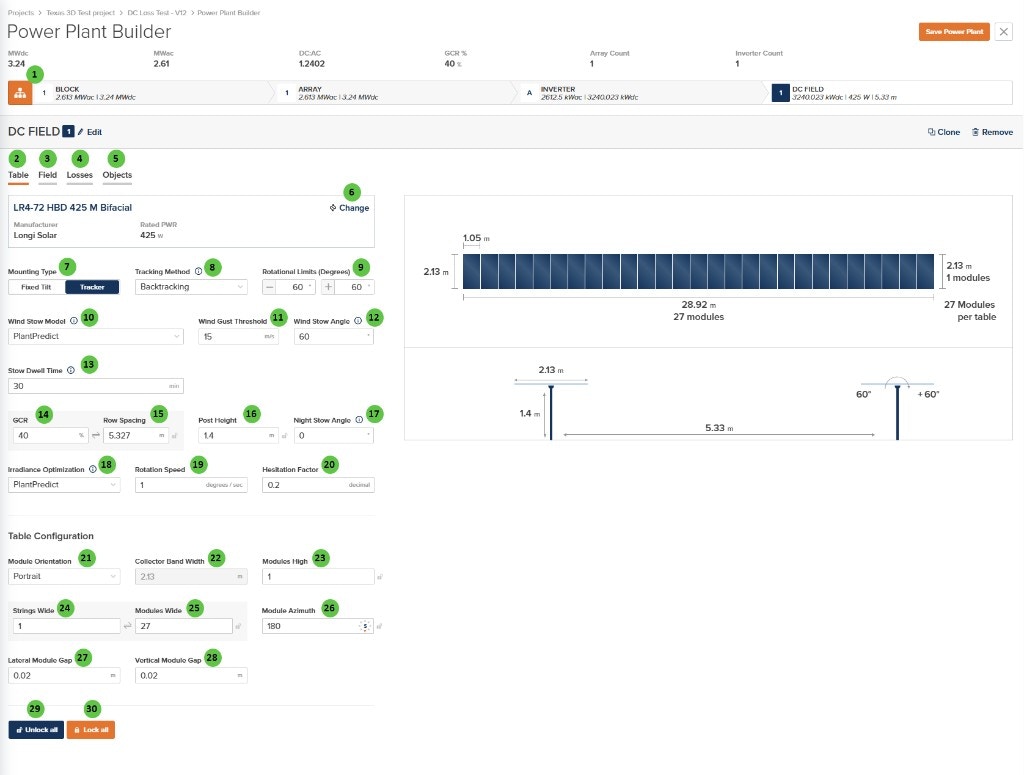
The DC Field - Table Page is organized into the following sections:
1. **DC Field Header** — Shows the DC Field identifier with Edit, Clone, and Remove buttons.
2. **Tab Navigation** — Access different aspects of DC Field configuration: Table, Field, Losses, and Objects.
3. **Module Selection** — Displays the currently selected PV module with manufacturer and rated power.
4. **Mounting & Tracking** — Configure mounting type, tracking method, rotational limits, and stow behavior (including **Stow Dwell Time** when using PlantPredict wind stow).
5. **Geometry Parameters** — Define GCR, row spacing, post height, night stow angle, and irradiance optimization (rotation speed, hesitation) when those model choices apply.
6. **Table Configuration** — Specify module orientation, dimensions, string layout, and module gaps.
***
## User Inputs
## Overview
The DC Field - Table Page is organized into the following sections:
1. **DC Field Header** — Shows the DC Field identifier with Edit, Clone, and Remove buttons.
2. **Tab Navigation** — Access different aspects of DC Field configuration: Table, Field, Losses, and Objects.
3. **Module Selection** — Displays the currently selected PV module with manufacturer and rated power.
4. **Mounting & Tracking** — Configure mounting type, tracking method, rotational limits, and stow behavior (including **Stow Dwell Time** when using PlantPredict wind stow).
5. **Geometry Parameters** — Define GCR, row spacing, post height, night stow angle, and irradiance optimization (rotation speed, hesitation) when those model choices apply.
6. **Table Configuration** — Specify module orientation, dimensions, string layout, and module gaps.
***
## User Inputs