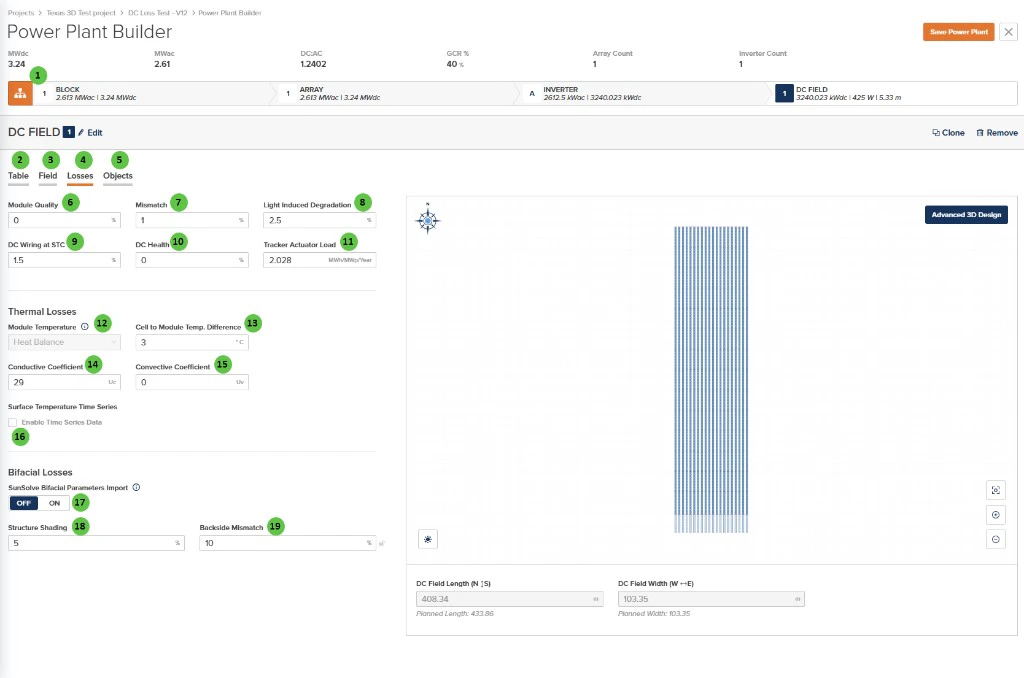
| **1** |
**Block** (Hierarchy) |
Button |
— |
Toggle view to show the Block-level hierarchy bar displaying system summary: MWdc, MWac, DC:AC ratio, GCR, Array Count, and Inverter Count. |
[Block Overview](/user-guide/ui/power-plant-builder-block) |
| **2** |
**Table** (Tab) |
Tab |
— |
Navigate to the Table tab to configure module selection, mounting type, and table geometry. |
[Table](/user-guide/ui/power-plant-builder-dc-field-table) |
| **3** |
**Field** (Tab) |
Tab |
— |
Navigate to the Field tab to configure string count, layout arrangement, terrain, and field-level settings. |
[Field](/user-guide/ui/power-plant-builder-dc-field-field) |
| **4** |
**Losses** (Tab) |
Tab |
— |
Currently selected tab. Contains DC loss factors and thermal model configuration. |
— |
| **5** |
**Objects** (Tab) |
Tab |
— |
Navigate to the Objects tab to configure near-field shading objects specific to this DC Field (legacy workflow). |
[Objects](/user-guide/ui/power-plant-builder-dc-field-objects) |
| **6** |
**Module Quality** |
Text Field |
% |
Percentage loss due to module manufacturing quality variation from nameplate rating. Positive values indicate underperformance relative to rated power. |
[DC Losses](/models/dc-performance/dc_system_losses) |
| **7** |
**Mismatch** |
Text Field |
% |
Percentage loss due to electrical mismatch between modules in a string or array. Accounts for variations in module I-V characteristics. |
[DC Losses](/models/dc-performance/dc_system_losses) |
| **8** |
**Light Induced Degradation** |
Text Field |
% |
Percentage loss from initial light-induced degradation (LID) that occurs in the first hours of module operation. Applies primarily to crystalline silicon modules. |
[DC Losses](/models/dc-performance/dc_system_losses) |
| **9** |
**DC Wiring at STC** |
Text Field |
% |
Percentage loss in DC wiring and connections at Standard Test Conditions (STC). Includes string wiring, combiner boxes, and DC home runs. |
[DC Losses](/models/dc-performance/dc_system_losses) |
| **10** |
**DC Health** |
Text Field |
% |
Percentage loss representing ongoing DC system degradation and health issues not captured by other loss categories. Can be used for aging adjustments. |
[DC Losses](/models/dc-performance/dc_system_losses) |
| **11** |
**Tracker Actuator Load** |
Text Field |
MWh/MWp/Year |
Annual energy consumption of tracker motors and actuators, expressed per MWp of DC capacity. Only applicable to tracker-mounted systems. |
— |
| **12** |
**Module Temperature** |
Dropdown |
— |
Select the module temperature calculation method. Options: **Heat Balance**, **Sandia**, **NOCT**. |
[Module Temperature](/models/dc-performance/overview#cell-temperature-models) |
| **13** |
**Cell to Module Temp. Difference** |
Text Field |
°C / °F |
Temperature offset between the module backsheet (measured) and cell junction temperature. Accounts for thermal resistance within the module. |
[Module Temperature](/models/dc-performance/overview#cell-temperature-models) |
| **14** |
**Conductive Coefficient** |
Text Field |
Uc |
Conductive heat transfer coefficient (Uc) for the heat balance model. Represents constant heat loss independent of wind speed. |
[Module Temperature](/models/dc-performance/overview#cell-temperature-models) |
| **15** |
**Convective Coefficient** |
Text Field |
Uv |
Convective heat transfer coefficient (Uv) for the heat balance model. Represents wind-dependent heat loss; multiplied by wind speed in the thermal calculation. |
[Module Temperature](/models/dc-performance/overview#cell-temperature-models) |
| **16** |
**Enable Time Series Data** |
Checkbox |
— |
When enabled, allows import of custom module surface temperature time series data instead of using the calculated thermal model. |
— |
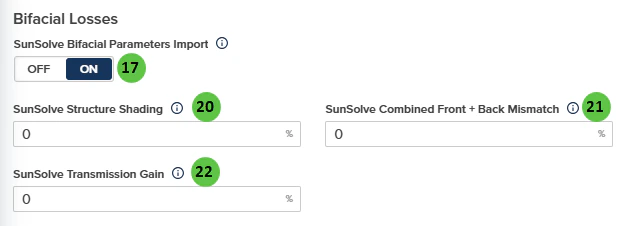
| **17** |
**SunSolve Bifacial Parameters Import** |
Toggle |
— |
When **ON**, PlantPredict uses the SunSolve-style inputs below and applies the rear-irradiance adjustment documented for SunSolve import on [Rear (bifacial) plane-of-array irradiance](/models/poa-irradiance/rear_irradiance) (for example, combined front + back mismatch overrides the **Mismatch** value in **General DC Losses**, and transmission-related handling follows the in-app tooltips). When **OFF**, use **Structure Shading** and **Backside Mismatch** in this section. |
[Rear (bifacial) plane-of-array irradiance](/models/poa-irradiance/rear_irradiance) |
| **18** |
**Structure Shading** |
Text Field |
% |
Rear-side loss from structure shading. Shown when **SunSolve Bifacial Parameters Import** is **OFF**. |
[Rear (bifacial) plane-of-array irradiance](/models/poa-irradiance/rear_irradiance) |
| **19** |
**Backside Mismatch** |
Text Field |
% |
Mismatch on the back side. Shown when **SunSolve Bifacial Parameters Import** is **OFF**. |
[Rear (bifacial) plane-of-array irradiance](/models/poa-irradiance/rear_irradiance) |
| **20** |
**SunSolve Structure Shading** |
Text Field |
% |
Shown when **SunSolve Bifacial Parameters Import** is **ON** (0–100%). |
[Rear (bifacial) plane-of-array irradiance](/models/poa-irradiance/rear_irradiance) |
| **21** |
**SunSolve Combined Front + Back Mismatch** |
Text Field |
% |
Shown when **SunSolve Bifacial Parameters Import** is **ON** (0–100%). Overrides the **Mismatch** value under **General DC Losses** while import is on. |
[Rear (bifacial) plane-of-array irradiance](/models/poa-irradiance/rear_irradiance) |
| **22** |
**SunSolve Transmission Gain** |
Text Field |
% |
Shown when **SunSolve Bifacial Parameters Import** is **ON** (0–100%). System-level gain applied in the rear-irradiance model; use the in-app info tooltip to avoid double-counting with module-level transmission settings. |
[Rear (bifacial) plane-of-array irradiance](/models/poa-irradiance/rear_irradiance) |
| **23** |
**Advanced 3D Design** |
Button |
— |
Opens the advanced 3D design interface for detailed field layout customization, including individual row placement and terrain modeling. |
[3D Shading](/models/shading/3d_shading_dc_field) |
 ## Overview
The DC Field - Losses page is organized into the following sections:
1. **DC Field Header** — Shows the DC Field identifier with Edit, Clone, and Remove buttons.
2. **Tab Navigation** — Access different aspects of DC Field configuration: Table, Field, Losses, and Objects.
3. **DC Losses** — Configure percentage-based losses for module quality, mismatch, degradation, wiring, and health factors, plus tracker power consumption.
4. **Thermal Losses** — Configure the module temperature model including heat balance parameters and temperature coefficients.
5. **Bifacial Losses** — Standard structure shading and backside mismatch inputs, or optional [SunSolve](https://www.sunsolve.com/)-style parameters when **SunSolve Bifacial Parameters Import** is enabled (see [rear irradiance](/models/poa-irradiance/rear_irradiance)).
6. **Surface Temperature Time Series** — Enable custom time series data for module surface temperature.
7. **DC Field Visualization** — Preview of the field layout for reference.
***
## User Inputs
## Overview
The DC Field - Losses page is organized into the following sections:
1. **DC Field Header** — Shows the DC Field identifier with Edit, Clone, and Remove buttons.
2. **Tab Navigation** — Access different aspects of DC Field configuration: Table, Field, Losses, and Objects.
3. **DC Losses** — Configure percentage-based losses for module quality, mismatch, degradation, wiring, and health factors, plus tracker power consumption.
4. **Thermal Losses** — Configure the module temperature model including heat balance parameters and temperature coefficients.
5. **Bifacial Losses** — Standard structure shading and backside mismatch inputs, or optional [SunSolve](https://www.sunsolve.com/)-style parameters when **SunSolve Bifacial Parameters Import** is enabled (see [rear irradiance](/models/poa-irradiance/rear_irradiance)).
6. **Surface Temperature Time Series** — Enable custom time series data for module surface temperature.
7. **DC Field Visualization** — Preview of the field layout for reference.
***
## User Inputs