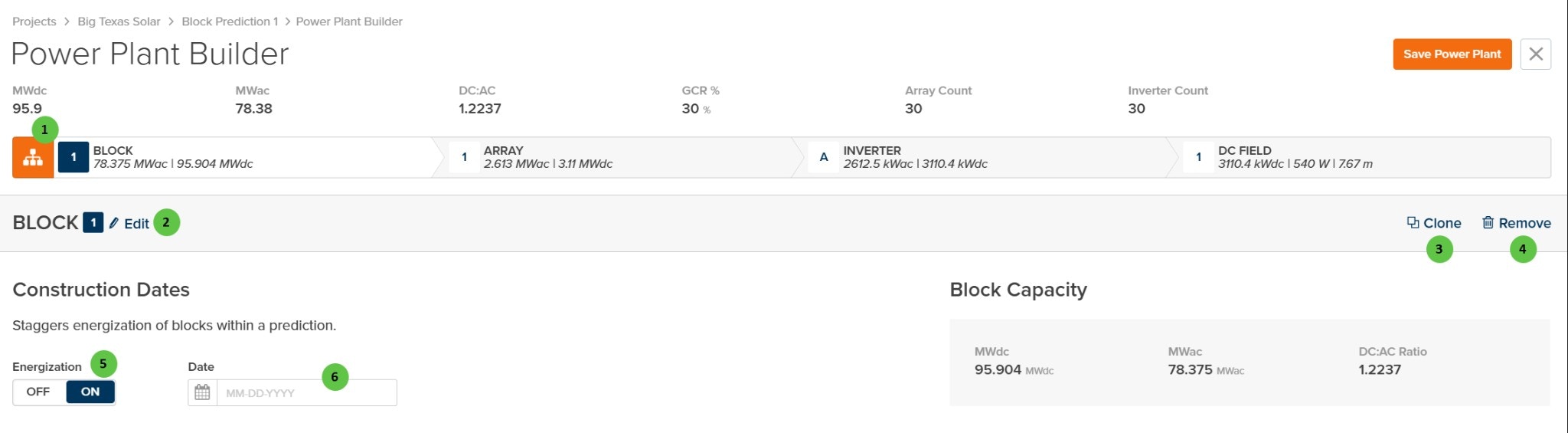
| **1** |
**Toggle View** |
Button |
— |
Toggles between condensed view (showing block summary and construction dates) and expanded view (showing the full hierarchy tree). Located on the hierarchy navigation bar. |
— |
| **2** |
**Edit** (Block) |
Button |
— |
Opens the Block configuration dialog to edit block-level parameters including the block name and repeater count. |
[Block Overview](/user-guide/ui/power-plant-builder-block) |
| **3** |
**Clone** (Block) |
Button |
— |
Creates a copy of the selected block including all arrays, inverters, and DC fields within it. |
— |
| **4** |
**Remove** (Block) |
Button |
— |
Removes the selected block and all associated arrays, inverters, and DC fields. This action requires confirmation. |
— |
| **5** |
**Energization** |
Toggle |
— |
When **ON**, enables construction date staggering for the block. This allows different blocks to have different energization dates, which affects degradation calculations. |
[Degradation](/models/inverter-models/degradation_dc_applied) |
| **6** |
**Date** |
Date Picker |
— |
Sets the energization date for the block. Only enabled when Energization toggle is **ON**. Format: MM-DD-YYYY. |
— |
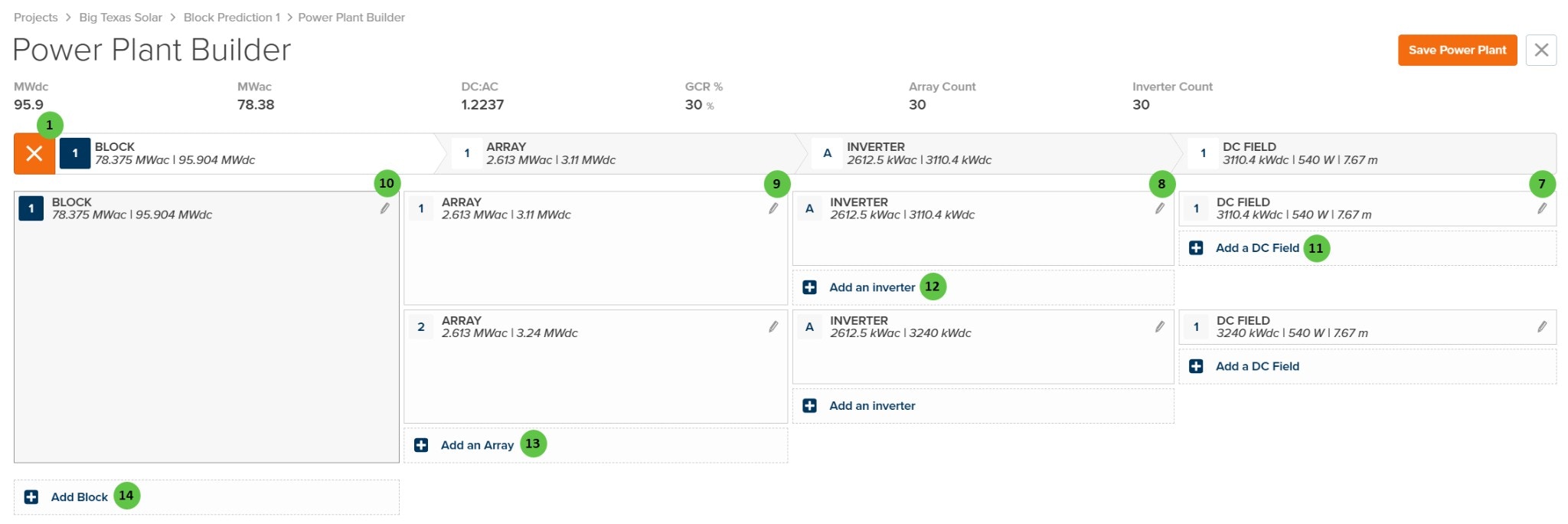
| **7** |
**DC Field** (Edit) |
Button |
— |
Click the edit icon to open the DC Field configuration page. The DC Field defines the module specifications, string configuration, and field-level losses. |
[DC Field - Table](/user-guide/ui/power-plant-builder-dc-field-table) |
| **8** |
**Inverter** (Header) |
Display |
— |
Shows inverter summary in the hierarchy navigation bar including AC capacity (kWac) and DC capacity (kWdc). |
[Inverter Overview](/models/inverter-models/overview) |
| **9** |
**Inverter** (Edit) |
Button |
— |
Click the edit icon to open the Inverter configuration page. The Inverter defines the inverter model, setpoint, and AC-side parameters. |
[Inverter](/user-guide/ui/power-plant-builder-inverter), [Inverter Overview](/models/inverter-models/overview) |
| **10** |
**Block** (Edit in List) |
Button |
— |
Click the edit icon in the expanded view to open the Block configuration dialog. |
— |
| **11** |
**Add a DC Field** |
Button |
— |
Adds a new DC Field to the selected inverter. Multiple DC fields can be connected to a single inverter. |
[DC Field Aggregation](/models/inverter-models/dc_field_aggregation) |
| **12** |
**Add an Inverter** |
Button |
— |
Adds a new inverter to the selected array. Multiple inverters can be configured within a single array. |
[Inverter Overview](/models/inverter-models/overview) |
| **13** |
**Add an Array** |
Button |
— |
Adds a new array to the selected block. Arrays represent groups of inverters that share common characteristics such as transformer and AC collection. |
[Array](/user-guide/ui/power-plant-builder-array) |
| **14** |
**Add Block** |
Button |
— |
Adds a new block to the power plant. Blocks are top-level groupings that can have independent construction dates and may represent physical sections of the plant. |
— |
 ## Overview
The Power Plant Builder Page is organized into the following sections:
1. **Header Bar** — Displays summary metrics (MWdc, MWac, DC:AC ratio, GCR%, Array Count, Inverter Count) and the Save Power Plant button.
2. **Hierarchy Navigation Bar** — Shows the plant topology as BLOCK → ARRAY → INVERTER → DC FIELD. Click to toggle between condensed and expanded views.
3. **Block Details (Condensed View)** — Shows individual block configuration including construction dates and block capacity summary.
4. **Hierarchy Tree (Expanded View)** — Shows the complete tree structure allowing you to add, edit, and navigate to any component in the plant hierarchy.
***
## User Inputs
## Overview
The Power Plant Builder Page is organized into the following sections:
1. **Header Bar** — Displays summary metrics (MWdc, MWac, DC:AC ratio, GCR%, Array Count, Inverter Count) and the Save Power Plant button.
2. **Hierarchy Navigation Bar** — Shows the plant topology as BLOCK → ARRAY → INVERTER → DC FIELD. Click to toggle between condensed and expanded views.
3. **Block Details (Condensed View)** — Shows individual block configuration including construction dates and block capacity summary.
4. **Hierarchy Tree (Expanded View)** — Shows the complete tree structure allowing you to add, edit, and navigate to any component in the plant hierarchy.
***
## User Inputs