| **1** |
**Block** (Hierarchy) |
Button |
— |
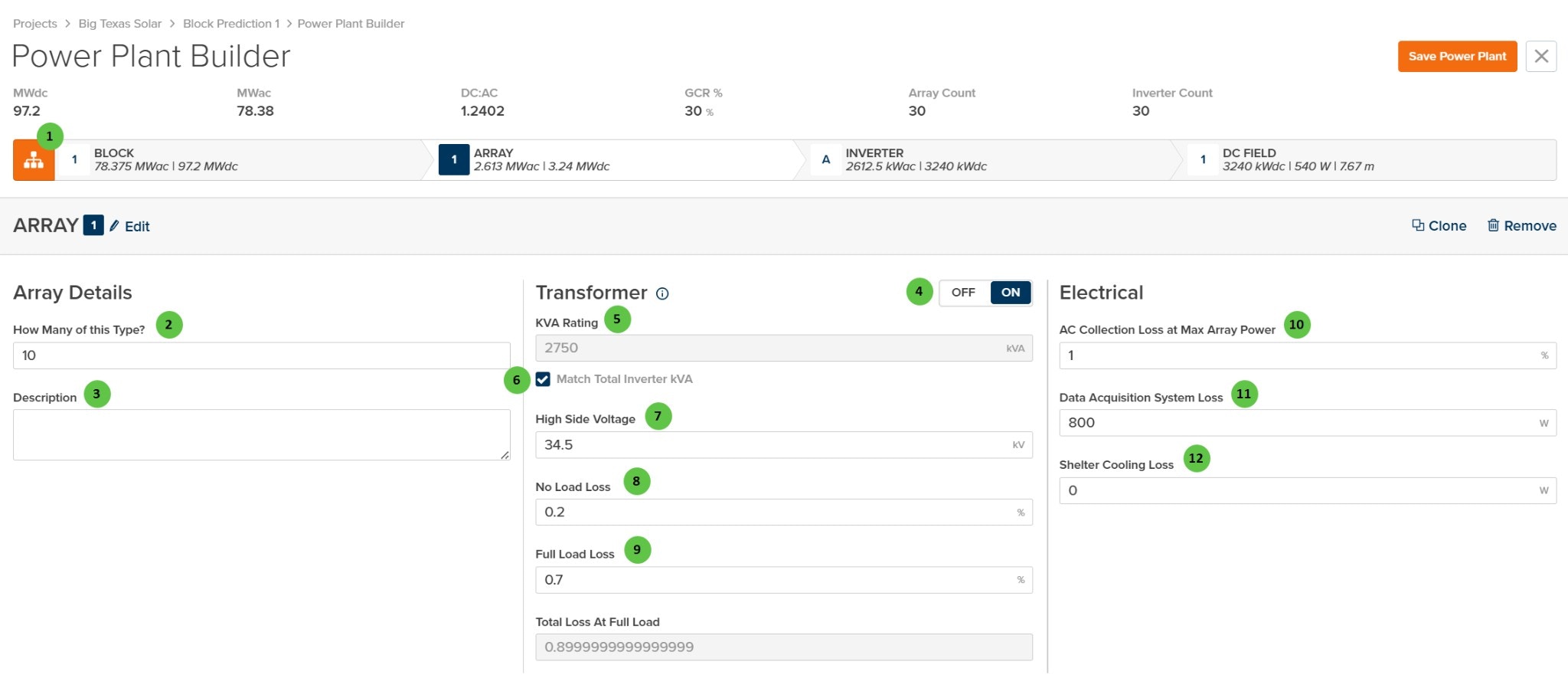
Toggle view to show the hierarchy bar displaying system summary at each level: Block, Array, Inverter, and DC Field. Shows MWdc, MWac, DC:AC ratio, GCR, Array Count, and Inverter Count. |
[Block Overview](/user-guide/ui/power-plant-builder-block) |
| **2** |
**How Many of this Type?** |
Text Field |
— |
Number of identical arrays within this Block. Each repeat uses the same transformer, inverter, and DC Field configuration. Useful for modeling uniform plant sections without duplicating design work. |
— |
| **3** |
**Description** |
Text Area |
— |
Optional text field for notes or comments about this array configuration. Does not affect simulation results. |
— |
| **4** |
**Transformer** (Toggle) |
Toggle |
— |
Enable or disable the MV transformer for this array. When **OFF**, transformer losses are not applied and the transformer configuration fields are hidden. When **ON**, the transformer parameters below become active. |
[AC System Losses](/models/ac-losses/ac_system_losses) |
| **5** |
**KVA Rating** |
Text Field |
kVA |
Apparent power rating of the MV transformer. Can be manually entered or automatically matched to the total inverter kVA rating using the checkbox below. |
[AC System Losses](/models/ac-losses/ac_system_losses) |
| **6** |
**Match Total Inverter kVA** |
Checkbox |
— |
When checked, the transformer kVA rating is automatically set to match the sum of all inverter kVA ratings in the array. Uncheck to manually specify a different transformer size. |
— |
| **7** |
**High Side Voltage** |
Text Field |
kV |
Medium-voltage output of the transformer (high side). Typical values range from 12 kV to 69 kV depending on the collection system design. |
— |
| **8** |
**No Load Loss** |
Text Field |
% |
Transformer core losses as a percentage of rated kVA. These losses occur whenever the transformer is energized, regardless of load. Also known as iron losses or excitation losses. |
[AC System Losses](/models/ac-losses/ac_system_losses) |
| **9** |
**Full Load Loss** |
Text Field |
% |
Transformer winding losses at full load as a percentage of rated kVA. Also known as copper losses or load losses. Scales with the square of the load. |
[AC System Losses](/models/ac-losses/ac_system_losses) |
| **10** |
**AC Collection Loss at Max Array Power** |
Text Field |
% |
Resistive losses in the MV collection circuit at maximum array power output. Includes cable and connection losses between the transformer and the point of interconnection. |
[AC System Losses](/models/ac-losses/ac_system_losses) |
| **11** |
**Data Acquisition System Loss** |
Text Field |
W |
Constant power consumption of data acquisition and monitoring equipment (SCADA, meters, sensors, communication systems) at the array level. |
— |
| **12** |
**Shelter Cooling Loss** |
Text Field |
W |
Constant power consumption for inverter shelter or equipment enclosure cooling systems (HVAC, fans). Set to 0 if no active cooling is used. |
— |
 ## Overview
The Array page is organized into the following sections:
1. **Hierarchy Bar** — Shows the current position in the plant hierarchy (Block → Array → Inverter → DC Field) with system capacity summaries.
2. **Array Header** — Displays the array identifier with Edit, Clone, and Remove buttons.
3. **Array Details** — Define how many arrays of this type exist and add optional notes.
4. **Transformer** — Configure the MV transformer including kVA rating, voltage, and loss parameters. The transformer can be toggled on or off.
5. **Electrical** — Configure AC collection losses including wiring losses and auxiliary power consumption.
***
## User Inputs
## Overview
The Array page is organized into the following sections:
1. **Hierarchy Bar** — Shows the current position in the plant hierarchy (Block → Array → Inverter → DC Field) with system capacity summaries.
2. **Array Header** — Displays the array identifier with Edit, Clone, and Remove buttons.
3. **Array Details** — Define how many arrays of this type exist and add optional notes.
4. **Transformer** — Configure the MV transformer including kVA rating, voltage, and loss parameters. The transformer can be toggled on or off.
5. **Electrical** — Configure AC collection losses including wiring losses and auxiliary power consumption.
***
## User Inputs