> ## Documentation Index
> Fetch the complete documentation index at: https://docs.plantpredict.com/llms.txt
> Use this file to discover all available pages before exploring further.
# RELEASE 12.07.0
February 6th, 2025
# **PlantPredict**
## **New Features & Updates!**
* **Improved Progress Loading Notifications**- We’ve greatly improved the reliability and responsiveness of our queue position and progress loading bar notifications for prediction runs, weather file downloads and 3D shade scene calculations.
* **Improved Weather File Page Responsiveness** - The retrieval of weather file records from user’s weather database has been streamlined to improve speed and responsiveness. Improvements have been made in how the weather database is queried and the weather page now defaults to being filtered by “My Weather” when opened to reduce the total number of records and display the data which is typically most relevant to the user.
* **Disabled Meteonorm Automated Downloads** - By default, we’ve disable automated Meteonorm TMY file downloads upon new Project creation. Previously, the creation of a new Project would automatically trigger the download of a Meteonorm weather file for the project latitude and longitude. This resulted in many duplicate and unused weather files.
## **BUG Fixes**
* Fixed several issues related to NSRDB PSM weather download errors
* Fixed an issue where cancelling a prediction when running with a legacy DC Field 3D scene leads to a prediction error.
* Fixed an issue where the SolarGIS API key for TMY and PVPlanner were not being retained upon save. These are now both retained.
* Fixed an bug related to PVC file upload errors.
* Fixed the units label (kWh/m^2) on the Block Results chart.
***
# **Terrain Pro**
## **New features & updates!**
**CSV file import feature** - We are excited to announce a new feature in Terrain Pro that enables users to import and process CSV files, similar to the existing functionality for DXF and Excel files. This enhancement provides greater flexibility and aligns Terrain Pro with Mercator, Terabase's internal tool.
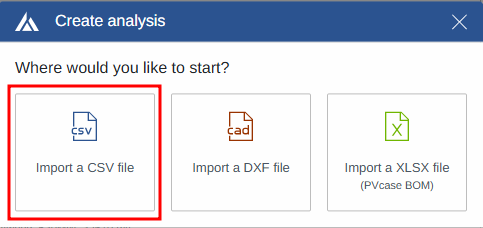 Key highlights of the CSV import feature:
* Two-step validation process to ensure data integrity
* Support for files with 5 or more columns
* Automatic mapping configuration based on saved user preferences
* Intuitive preview and mapping modification options
* Seamless data import into Terrain Pro after validation and mapping
Key highlights of the CSV import feature:
* Two-step validation process to ensure data integrity
* Support for files with 5 or more columns
* Automatic mapping configuration based on saved user preferences
* Intuitive preview and mapping modification options
* Seamless data import into Terrain Pro after validation and mapping
 Please refer to the updated documentation for detailed instructions on importing CSV files into Terrain Pro.
**Heatmap and contour line improvements** - We have addressed an issue where noise appeared in heatmaps and contour lines at the edges of irregularly shaped site layouts in Terrain Pro. This was caused by incorrect surface assumptions when connecting pile-level data at the perimeter.
The algorithm for handling edge data has been enhanced, resulting in the following improvements:
* Smooth and accurate heatmaps and contour lines at site layout perimeters
* Elimination of visual artifacts and noise
* More precise representations of terrain at the edges
Please refer to the updated documentation for detailed instructions on importing CSV files into Terrain Pro.
**Heatmap and contour line improvements** - We have addressed an issue where noise appeared in heatmaps and contour lines at the edges of irregularly shaped site layouts in Terrain Pro. This was caused by incorrect surface assumptions when connecting pile-level data at the perimeter.
The algorithm for handling edge data has been enhanced, resulting in the following improvements:
* Smooth and accurate heatmaps and contour lines at site layout perimeters
* Elimination of visual artifacts and noise
* More precise representations of terrain at the edges

 This fix is immediately available in the latest version of Terrain Pro
**DXF data processing optimization** - We have implemented an improvement in how Terrain Pro retrieves block information from DXF files. Instead of relying on the block info section, which could be corrupted in certain cases, the application now extracts block information directly from the model space of the CAD file.
Benefits of this optimization include:
* Increased flexibility when reading DXF files
* Improved compatibility with files generated by various tools
* More robust handling of purged or non-standard DXF files
This enhancement is automatically applied when importing DXF files into Terrain Pro. Users can expect a smoother and more reliable experience when working with DXF data.
\*\*Elevation surface layer toggle removal \*\*- the Elevation Surface Layer toggles have been removed from the toolbar. Users can toggle these layers directly in the middle of the screen, eliminating redundancy and potential confusion.
## **Bug fixes**
**Report template update** - The Terrain Pro report template has been updated to refer to the application as "Design Pro" instead of "Development Platform".
***
# **Design Pro**
## **New features & updates!**
**Enhanced scenario comparison** -The scenario report comparison has been updated to add into the “User inputs” section for the PV module:
* Module ID
* Module name
for the inverter:
* Inverter ID
These enhancements leverage the data from the PlantPredict libraries used by Design Pro, providing users with more comprehensive insights when comparing scenarios. The same updates are also reflected in the comparison file in Excel format.
This fix is immediately available in the latest version of Terrain Pro
**DXF data processing optimization** - We have implemented an improvement in how Terrain Pro retrieves block information from DXF files. Instead of relying on the block info section, which could be corrupted in certain cases, the application now extracts block information directly from the model space of the CAD file.
Benefits of this optimization include:
* Increased flexibility when reading DXF files
* Improved compatibility with files generated by various tools
* More robust handling of purged or non-standard DXF files
This enhancement is automatically applied when importing DXF files into Terrain Pro. Users can expect a smoother and more reliable experience when working with DXF data.
\*\*Elevation surface layer toggle removal \*\*- the Elevation Surface Layer toggles have been removed from the toolbar. Users can toggle these layers directly in the middle of the screen, eliminating redundancy and potential confusion.
## **Bug fixes**
**Report template update** - The Terrain Pro report template has been updated to refer to the application as "Design Pro" instead of "Development Platform".
***
# **Design Pro**
## **New features & updates!**
**Enhanced scenario comparison** -The scenario report comparison has been updated to add into the “User inputs” section for the PV module:
* Module ID
* Module name
for the inverter:
* Inverter ID
These enhancements leverage the data from the PlantPredict libraries used by Design Pro, providing users with more comprehensive insights when comparing scenarios. The same updates are also reflected in the comparison file in Excel format.
 **Spectral shift factor** - A new feature has been introduced in the losses menu, allowing users to select from three different models to calculate the spectral shift loss factor:
* None
* Param Pwat or Sandia
* Param Pwat and AM
This addition enables users to choose the most appropriate model for their specific project requirements.
**Spectral shift factor** - A new feature has been introduced in the losses menu, allowing users to select from three different models to calculate the spectral shift loss factor:
* None
* Param Pwat or Sandia
* Param Pwat and AM
This addition enables users to choose the most appropriate model for their specific project requirements.
 ## **Bug fixes**
**GRC-Capacity Page Inverters Calculation** - An issue has been resolved where the inverter quantity cell was not updating correctly when the AC capacity was provided by the user on the GRC-Capacity page. The bug has been fixed, and the inverter quantity now updates accurately based on the user-provided AC capacity.
## **Bug fixes**
**GRC-Capacity Page Inverters Calculation** - An issue has been resolved where the inverter quantity cell was not updating correctly when the AC capacity was provided by the user on the GRC-Capacity page. The bug has been fixed, and the inverter quantity now updates accurately based on the user-provided AC capacity.
 **KML File Reading Improvement** - We have implemented a new logic to handle KML/KMZ files where the geometries representing boundaries are designed as single lines instead of multi-geometry. Design Pro can now successfully read these files and represent the geometries on the map. Please note that if the geometries are not "closed," Design Pro will always consider them as roads or linear exclusions.
***
# **Voltage Pro**
## **Bug fixes**
**Existing String Calculations Accessibility** - A bug affecting a limited number of users, where previously run string configurations were no longer accessible, has been resolved. Users can now access their existing string calculations without any issues.
**KML File Reading Improvement** - We have implemented a new logic to handle KML/KMZ files where the geometries representing boundaries are designed as single lines instead of multi-geometry. Design Pro can now successfully read these files and represent the geometries on the map. Please note that if the geometries are not "closed," Design Pro will always consider them as roads or linear exclusions.
***
# **Voltage Pro**
## **Bug fixes**
**Existing String Calculations Accessibility** - A bug affecting a limited number of users, where previously run string configurations were no longer accessible, has been resolved. Users can now access their existing string calculations without any issues.