> ## Documentation Index
> Fetch the complete documentation index at: https://docs.plantpredict.com/llms.txt
> Use this file to discover all available pages before exploring further.
# RELEASE 08.23.0
September 23, 2021
### **Quality Check is now available when doing a one-click weather download**
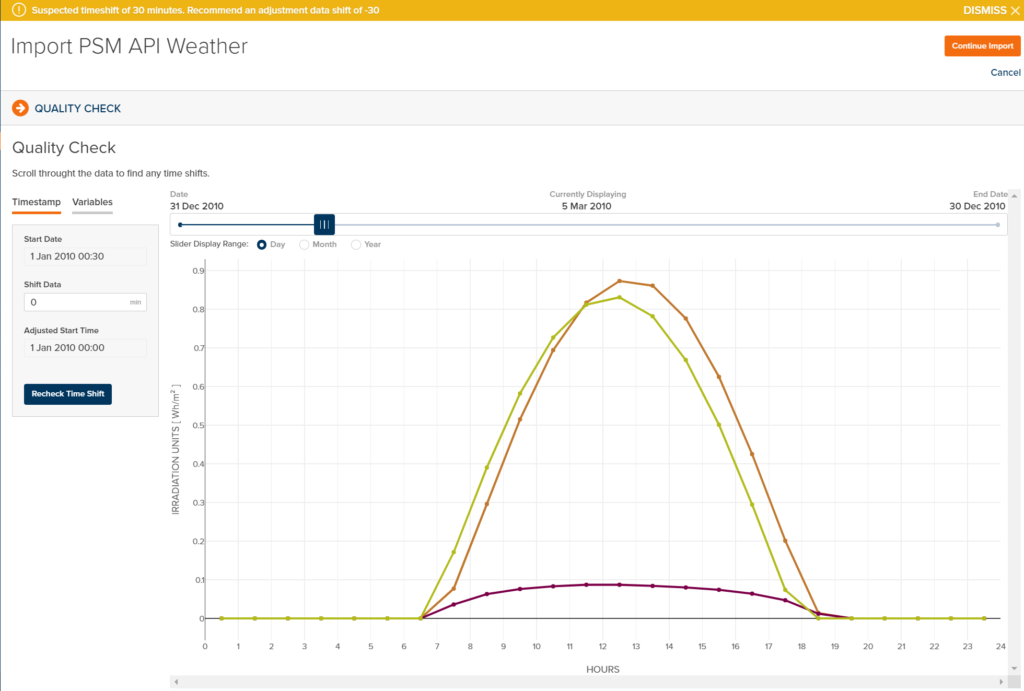
We have been focusing on improving our Weather Import features for PlantPredict Premium subscribers. Last release we introduced Solcast as a new weather data provider. This release we incorporated the Quality Check feature when using the 1-click weather import. Certain places around the world have time zones that don’t always align with our weather providers. You now have a chance to review the weather data and apply a time shift to ensure that the weather data you are importing aligns with the solar time zone at the location you are modeling. This quality check has been a part of the weather file upload for a long time, so we just implemented it in the 1-click weather download process, since it is proven to work very well.
After the weather data has downloaded, you are taken to a Quality Check screen to review and shift data if needed.
 We also added Map Data to the .PPP Project and Predict Export and Import process. This makes .PPP Files more complete.
BUG FIXES
* Fixed header row styling when importing weather. Previously, the header was shown incorrectly and over the top of data.
* Within MapBuilder, saving the prediction would fail if a constraint was selected that had no label.
We also added Map Data to the .PPP Project and Predict Export and Import process. This makes .PPP Files more complete.
BUG FIXES
* Fixed header row styling when importing weather. Previously, the header was shown incorrectly and over the top of data.
* Within MapBuilder, saving the prediction would fail if a constraint was selected that had no label.