> ## Documentation Index
> Fetch the complete documentation index at: https://docs.plantpredict.com/llms.txt
> Use this file to discover all available pages before exploring further.
# Current Version
# **RELEASE 12.28.0**
**June 25, 2026**
# **PlantPredict**
### **PVsyst Project Import (Beta)**
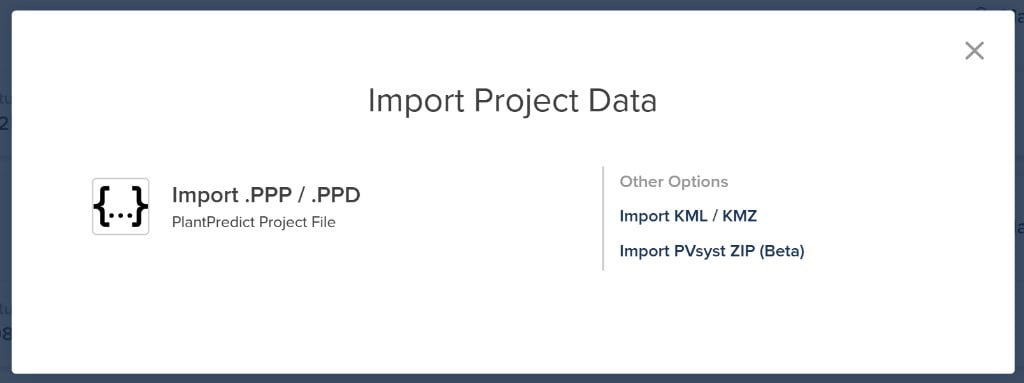
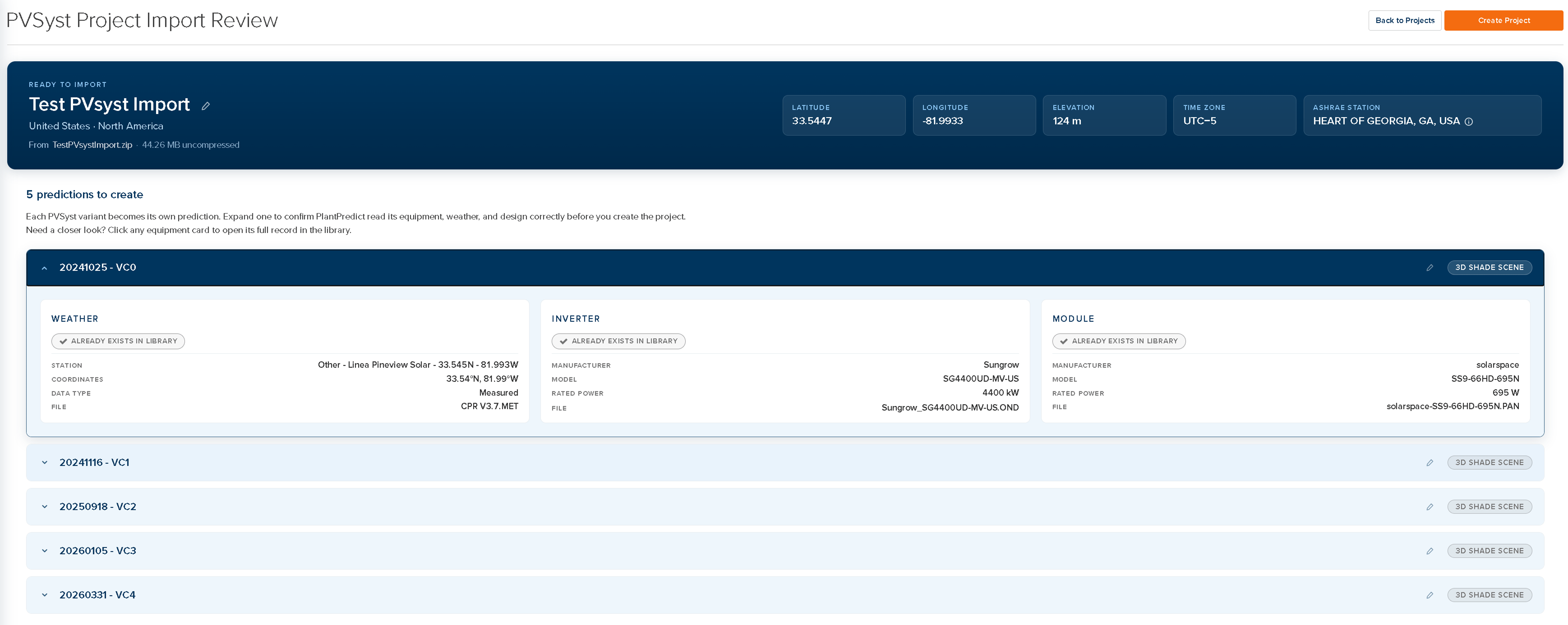
You can now import a complete **PVsyst project** from a ZIP file. The PVsyst project (PRJ) becomes a PlantPredict project, and each calculation variant (VC#) becomes a separate prediction, with modules (PAN), inverters (OND), weather data (MET) and 3D scenes (SHD) imported automatically.
 ### **Import PVsyst .MET Weather Files**
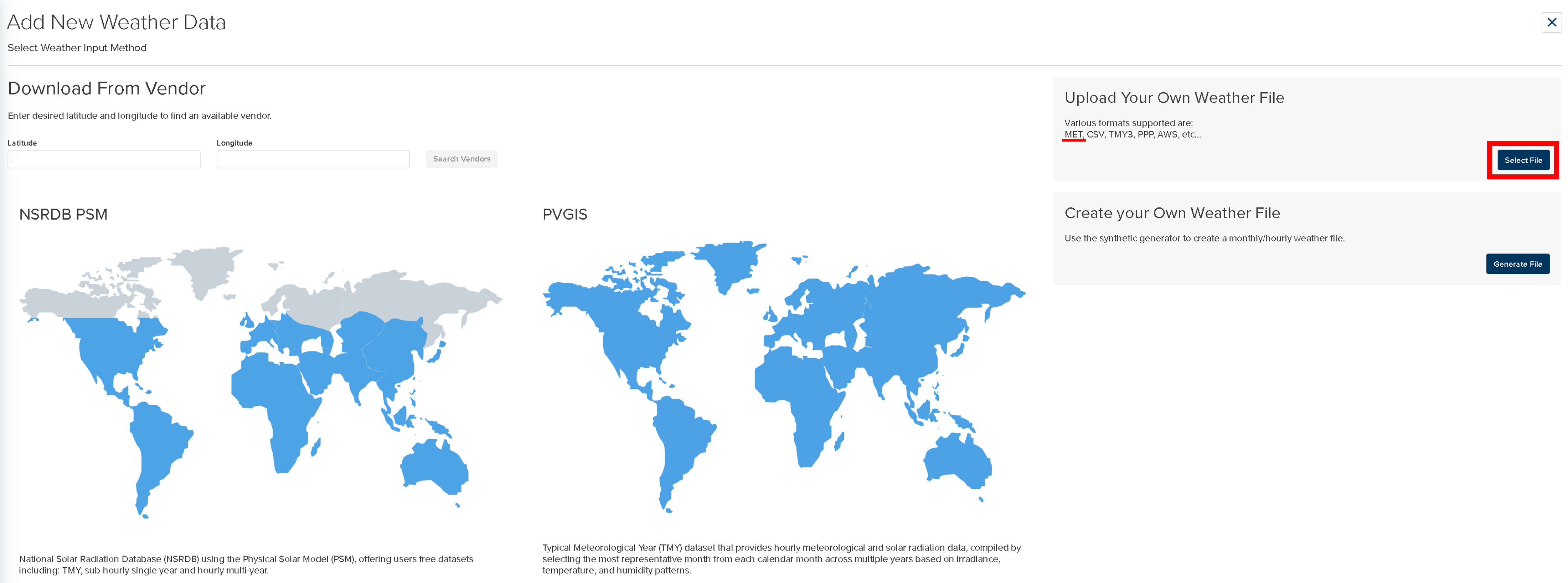
You can now import **PVsyst `.MET` weather files** directly into PlantPredict. Upload a PVsyst (version 6.40 or above) `.MET` file through **Weather Library → Add New Weather → Upload Your Own Weather File → Select File**, and PlantPredict parses GHI, DHI, POAI (if available), ambient temperature, wind speed, and relative humidity along with site metadata (latitude, longitude, elevation, time zone). Sub-hourly `.MET` files are supported, and `.MET` files included in a PVsyst project import are handled automatically.
### **Import PVsyst .MET Weather Files**
You can now import **PVsyst `.MET` weather files** directly into PlantPredict. Upload a PVsyst (version 6.40 or above) `.MET` file through **Weather Library → Add New Weather → Upload Your Own Weather File → Select File**, and PlantPredict parses GHI, DHI, POAI (if available), ambient temperature, wind speed, and relative humidity along with site metadata (latitude, longitude, elevation, time zone). Sub-hourly `.MET` files are supported, and `.MET` files included in a PVsyst project import are handled automatically.
 ### **Terrain-Aware Backtracking V2 (V13 beta)**
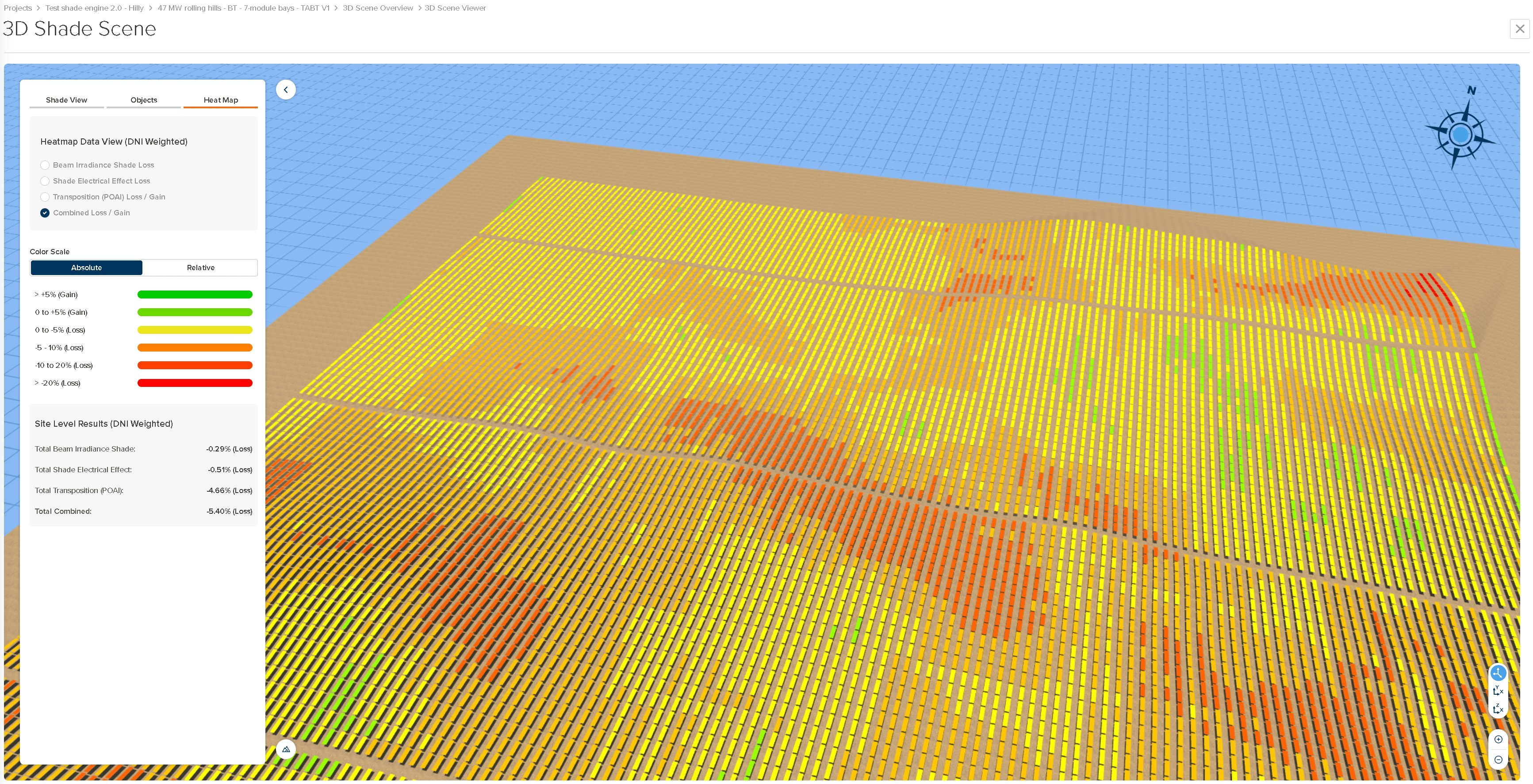
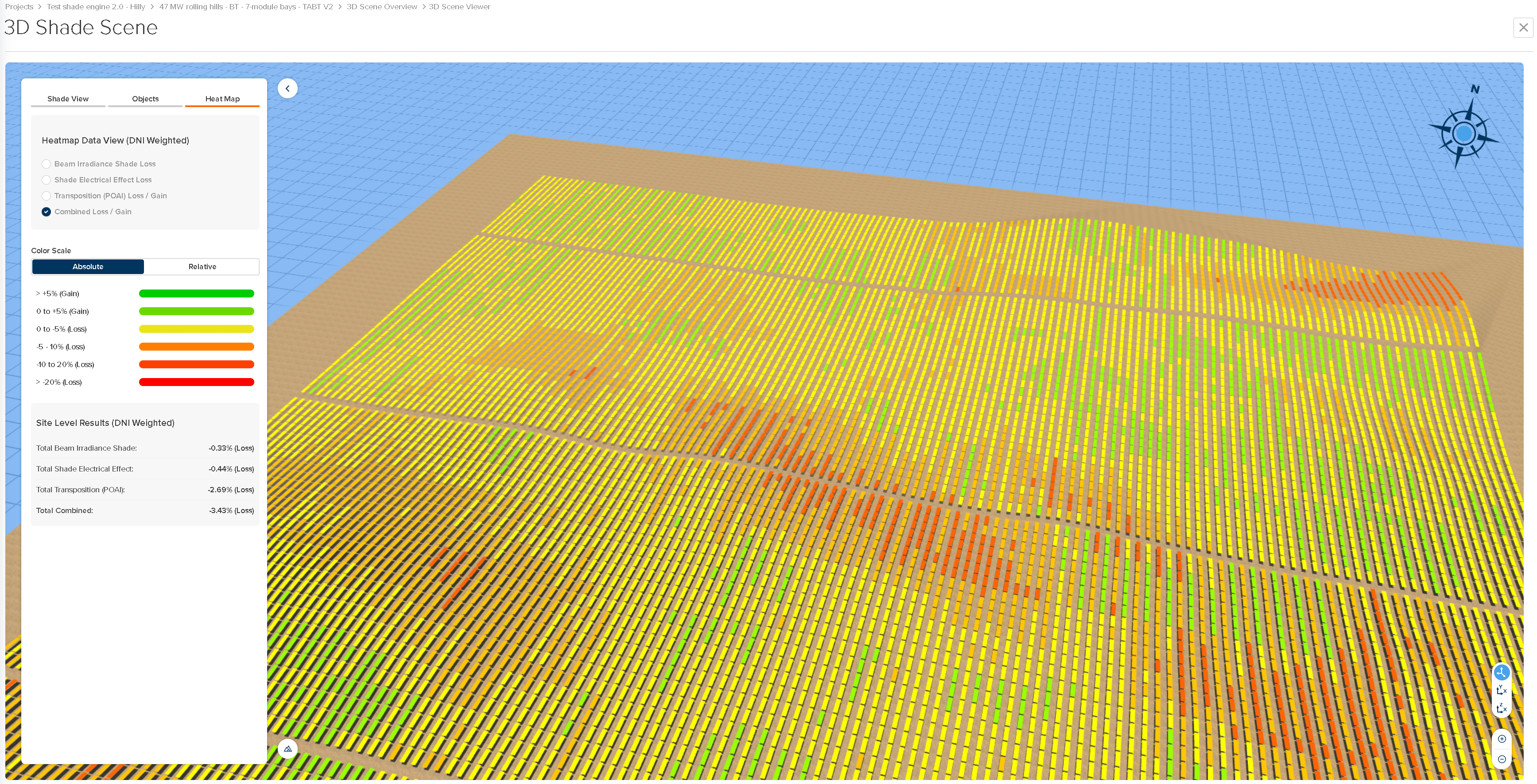
Terrain-aware backtracking has been rebuilt as a **true 3D** calculation, extending Anderson & Jensen's (2024) shaded-fraction model for single-axis trackers on rolling terrain. The previous version only worked in the east–west plane; the new version evaluates shading **in the plane of the sun**, accounting for the trackers that actually fall upstream in the sun's direction and the real terrain between them. As a result it now supports **non-N–S tracker azimuths** and **multi-azimuth power plants** (each azimuth block is solved in its own rotation plane), with improved handling of situations where some shade is unavoidable. Additionally, it now respects **wind stow** and **irradiance optimization**, with a clear precedence of **wind stow → irradiance optimization → terrain-aware backtracking**. Together, these improvements produce more optimal backtracking angles that reduce shade and transposition losses, resulting in a higher energy yield.
### **Terrain-Aware Backtracking V2 (V13 beta)**
Terrain-aware backtracking has been rebuilt as a **true 3D** calculation, extending Anderson & Jensen's (2024) shaded-fraction model for single-axis trackers on rolling terrain. The previous version only worked in the east–west plane; the new version evaluates shading **in the plane of the sun**, accounting for the trackers that actually fall upstream in the sun's direction and the real terrain between them. As a result it now supports **non-N–S tracker azimuths** and **multi-azimuth power plants** (each azimuth block is solved in its own rotation plane), with improved handling of situations where some shade is unavoidable. Additionally, it now respects **wind stow** and **irradiance optimization**, with a clear precedence of **wind stow → irradiance optimization → terrain-aware backtracking**. Together, these improvements produce more optimal backtracking angles that reduce shade and transposition losses, resulting in a higher energy yield.
 ### **Subscription Self-Management Expansion**
Subscription admins can now manage more of their subscription directly in PlantPredict: **add or remove licenses**, **add or remove extensions**, and **upgrade or downgrade their subscription tier**. Adding licenses or extensions takes effect immediately at a prorated price, while reductions and downgrades take effect at the next renewal.
### **Dark Mode**
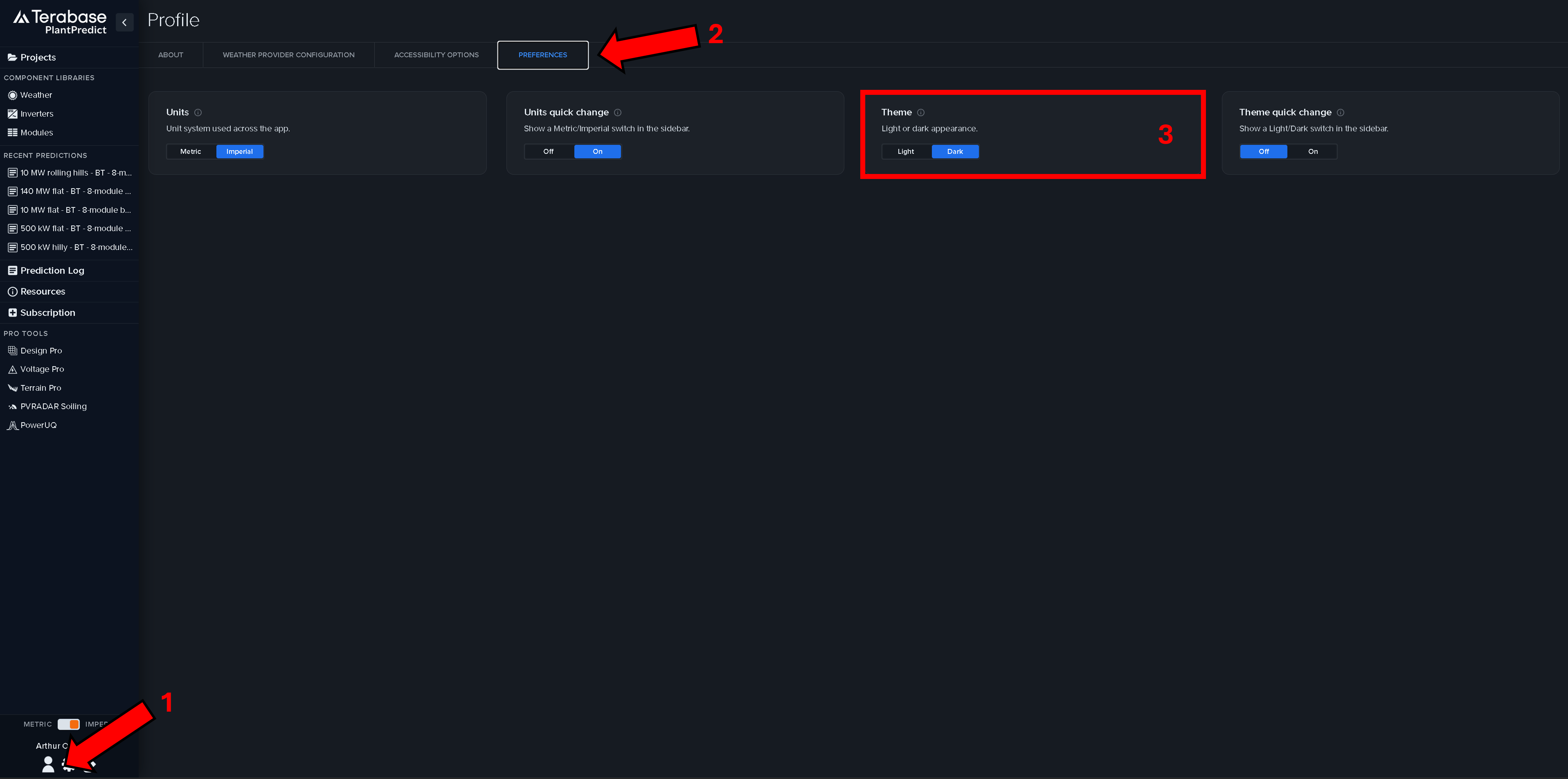
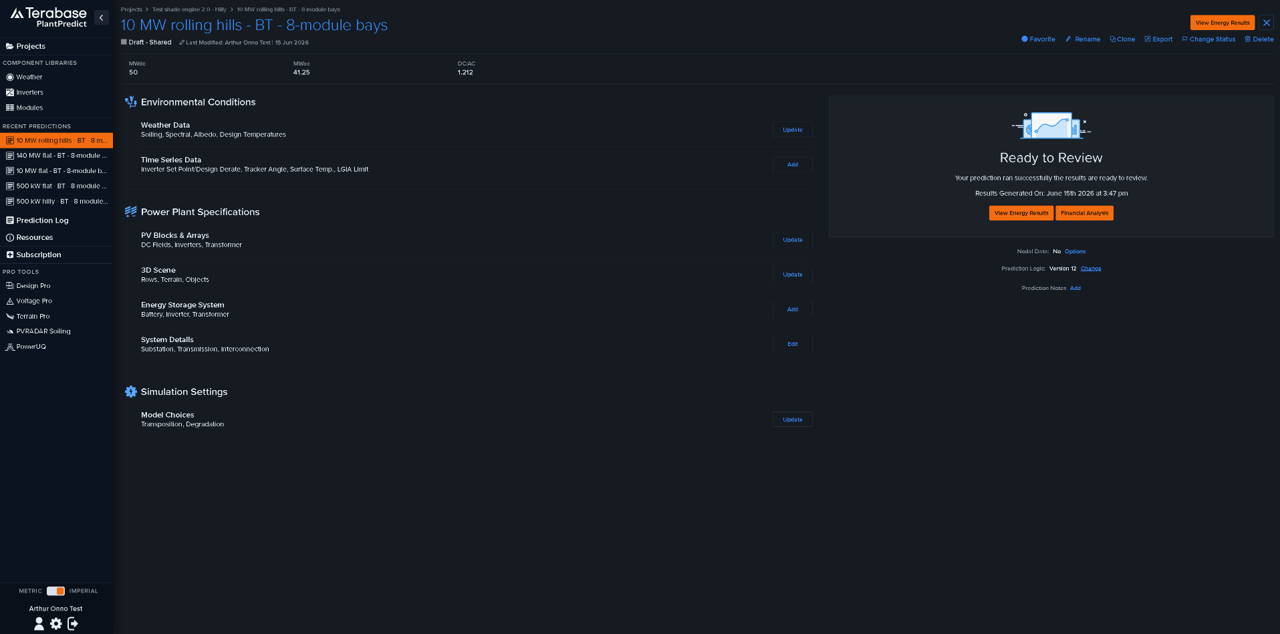
PlantPredict now offers a **Dark Mode**. Switch between **Light** and **Dark** themes from the new **Preferences** tab in your **Profile**. Your selection is saved to your account and applied automatically wherever you sign in. Light mode is unchanged.
### **Subscription Self-Management Expansion**
Subscription admins can now manage more of their subscription directly in PlantPredict: **add or remove licenses**, **add or remove extensions**, and **upgrade or downgrade their subscription tier**. Adding licenses or extensions takes effect immediately at a prorated price, while reductions and downgrades take effect at the next renewal.
### **Dark Mode**
PlantPredict now offers a **Dark Mode**. Switch between **Light** and **Dark** themes from the new **Preferences** tab in your **Profile**. Your selection is saved to your account and applied automatically wherever you sign in. Light mode is unchanged.
 ### **3D (Deprecated) Shading Algorithm Retired for New Predictions**
The legacy **"3D (Deprecated)"** DC-field-level option has been removed from the **Shading Algorithm** menu for new predictions in Block Builder. Existing predictions are unaffected. Site-level 3D simulations—terrain-aware backtracking, transposition, and shading—should now be run through the [3D scene](/user-guide/ui/3d-scene-overview).
## **Improvements and Bug Fixes**
* **Sub-hourly multi-year predictions**—Fixed an issue where a multi-year prediction that used a sub-hourly weather file only simulated the first year of data. Multi-year runs now use all selected years.
* **PlantSummary8760 Plant Energy total (V13)**—Fixed a regression where the **Plant Energy** total (cell S13) in the 8760 export showed Net Energy instead of Gross Energy for non-ESS V13 predictions. The total again reconciles with the sum of the hourly values and with Plant Net Energy.
* **Vertical modules at 90° tilt**—Fixed 3D scene distortion and the PVC download failure that occurred when modeling vertical (90° tilt) modules in a fixed-tilt structure, removing the need for the previous 89.9° workaround.
* **Clear-sky air mass (V13)**—Fixed an error in the Bird Clear Sky air mass calculation that biased modeled clear-sky irradiance. This affects predictions that use the DIRINT decomposition model.
* **Extraterrestrial irradiance (V13)**—Corrected the Spencer Fourier expansion term used for extraterrestrial irradiance. The effect is negligible; the fix aligns the calculation with the published formula.
* **Transmission-line loss power factor (V13)**—Fixed an issue where the plant power factor used in the transmission-line loss calculation was derived from the weighted-average inverter design derate ("Plant kVA Derate"), causing a real-power inverter derate to inflate modeled transmission losses (which scale with 1/PF²). Power factor is now fixed at 1.0 in the transmission-line calculation, so derating an inverter's real-power setpoint no longer affects transmission losses. For plants with derated inverters, modeled transmission losses decrease and AC energy at the grid point increases slightly. Plants at unity (no derate) are unchanged.
* **Loss factor aggregates with NaN values**—Fixed an issue on the results page where loss factor aggregates displayed as 0 whenever a single underlying value was NaN. Aggregates now correctly handle NaN values, so results for affected predictions are accurate without rerunning. This UI fix applies to all versions.
* **Irradiance optimization 0° tilt (V13)**—Corrected a 0-denominator condition in the irradiance optimization logic that could yield a 0° tilt angle and propagate NaN values into the hourly loss factors. New V13 predictions no longer produce these NaN values at the source.
***
# **Pro Tools**
### **Terrain Pro: Import Your Own GeoTIFF as the Original Surface**
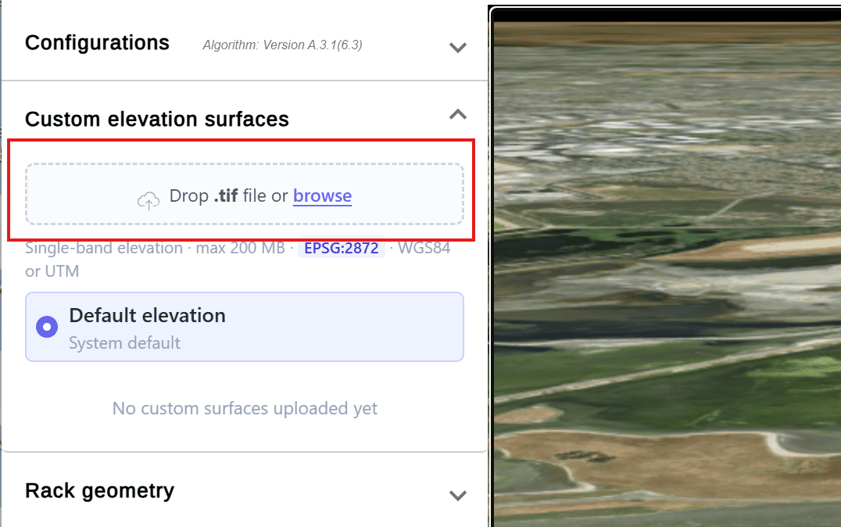
You can now import your own **GeoTIFF** file to use as the original surface in Terrain Pro. Once imported, the custom surface can be selected (in place of the **Default elevation** surface) and used across all configuration runs. This feature is only available when the source analysis data is derived from **DXF** or **Design Pro**.
### **3D (Deprecated) Shading Algorithm Retired for New Predictions**
The legacy **"3D (Deprecated)"** DC-field-level option has been removed from the **Shading Algorithm** menu for new predictions in Block Builder. Existing predictions are unaffected. Site-level 3D simulations—terrain-aware backtracking, transposition, and shading—should now be run through the [3D scene](/user-guide/ui/3d-scene-overview).
## **Improvements and Bug Fixes**
* **Sub-hourly multi-year predictions**—Fixed an issue where a multi-year prediction that used a sub-hourly weather file only simulated the first year of data. Multi-year runs now use all selected years.
* **PlantSummary8760 Plant Energy total (V13)**—Fixed a regression where the **Plant Energy** total (cell S13) in the 8760 export showed Net Energy instead of Gross Energy for non-ESS V13 predictions. The total again reconciles with the sum of the hourly values and with Plant Net Energy.
* **Vertical modules at 90° tilt**—Fixed 3D scene distortion and the PVC download failure that occurred when modeling vertical (90° tilt) modules in a fixed-tilt structure, removing the need for the previous 89.9° workaround.
* **Clear-sky air mass (V13)**—Fixed an error in the Bird Clear Sky air mass calculation that biased modeled clear-sky irradiance. This affects predictions that use the DIRINT decomposition model.
* **Extraterrestrial irradiance (V13)**—Corrected the Spencer Fourier expansion term used for extraterrestrial irradiance. The effect is negligible; the fix aligns the calculation with the published formula.
* **Transmission-line loss power factor (V13)**—Fixed an issue where the plant power factor used in the transmission-line loss calculation was derived from the weighted-average inverter design derate ("Plant kVA Derate"), causing a real-power inverter derate to inflate modeled transmission losses (which scale with 1/PF²). Power factor is now fixed at 1.0 in the transmission-line calculation, so derating an inverter's real-power setpoint no longer affects transmission losses. For plants with derated inverters, modeled transmission losses decrease and AC energy at the grid point increases slightly. Plants at unity (no derate) are unchanged.
* **Loss factor aggregates with NaN values**—Fixed an issue on the results page where loss factor aggregates displayed as 0 whenever a single underlying value was NaN. Aggregates now correctly handle NaN values, so results for affected predictions are accurate without rerunning. This UI fix applies to all versions.
* **Irradiance optimization 0° tilt (V13)**—Corrected a 0-denominator condition in the irradiance optimization logic that could yield a 0° tilt angle and propagate NaN values into the hourly loss factors. New V13 predictions no longer produce these NaN values at the source.
***
# **Pro Tools**
### **Terrain Pro: Import Your Own GeoTIFF as the Original Surface**
You can now import your own **GeoTIFF** file to use as the original surface in Terrain Pro. Once imported, the custom surface can be selected (in place of the **Default elevation** surface) and used across all configuration runs. This feature is only available when the source analysis data is derived from **DXF** or **Design Pro**.
 ## **Improvements and Bug Fixes**
* **Terrain Pro: Basemap mismatch in 3D map**—Fixed an issue where, in some analyses containing multiple offset site boundaries, the basemap imagery did not align with the site footprint in the 3D map. The basemap now matches the site layout.
* **Terrain Pro: Heat map loading on small sites**—Improved heat map loading performance on small sites, which had been loading slower than expected.
* **Design Pro: DC MW target not met in final layout**—Fixed an issue where Design Pro simulations using a **DC MW target** could produce final layouts that did not meet the requested DC capacity, even when the GCR–capacity chart indicated the target was achievable. Completed simulation output now matches the requested DC MW target.
## **Improvements and Bug Fixes**
* **Terrain Pro: Basemap mismatch in 3D map**—Fixed an issue where, in some analyses containing multiple offset site boundaries, the basemap imagery did not align with the site footprint in the 3D map. The basemap now matches the site layout.
* **Terrain Pro: Heat map loading on small sites**—Improved heat map loading performance on small sites, which had been loading slower than expected.
* **Design Pro: DC MW target not met in final layout**—Fixed an issue where Design Pro simulations using a **DC MW target** could produce final layouts that did not meet the requested DC capacity, even when the GCR–capacity chart indicated the target was achievable. Completed simulation output now matches the requested DC MW target.